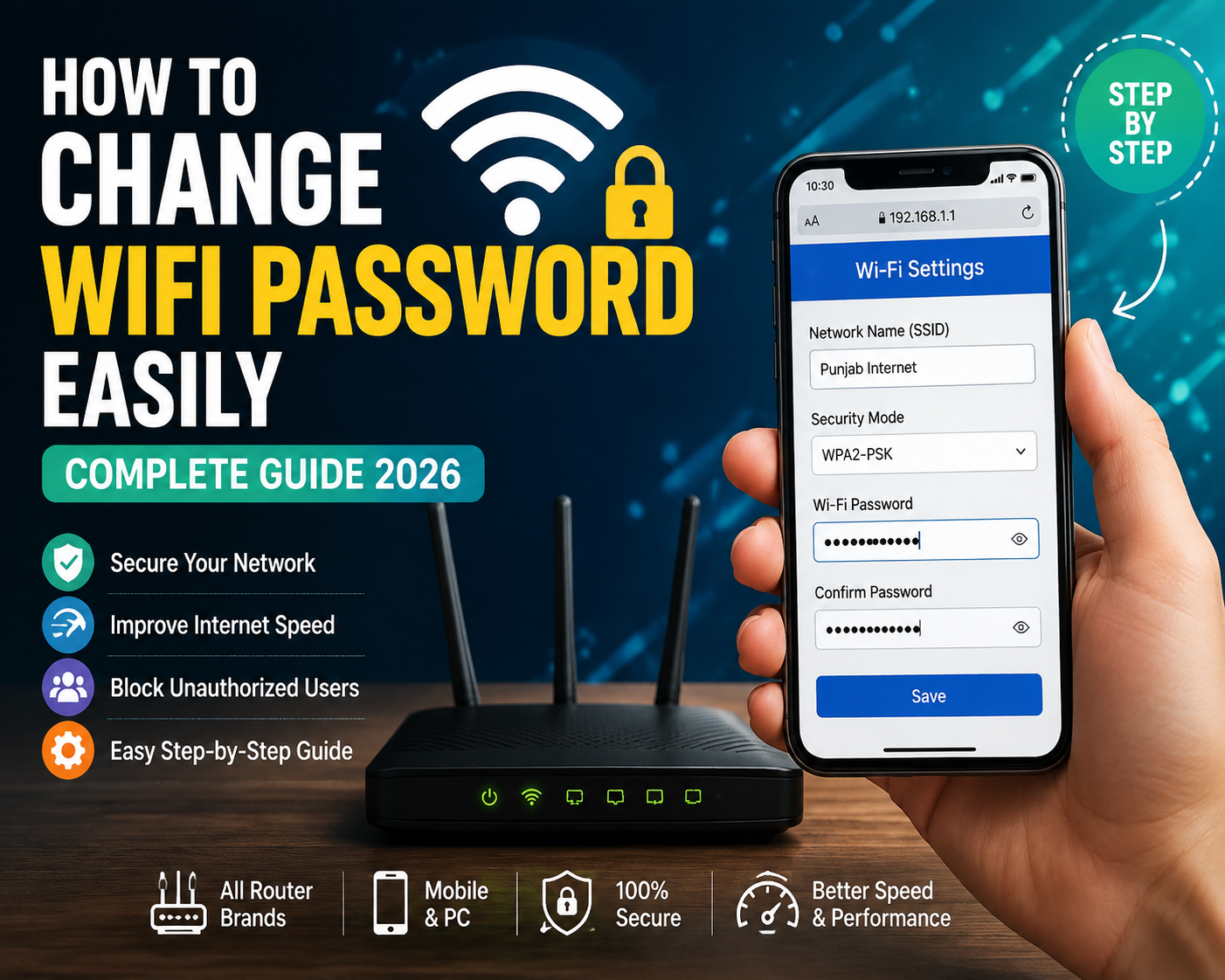
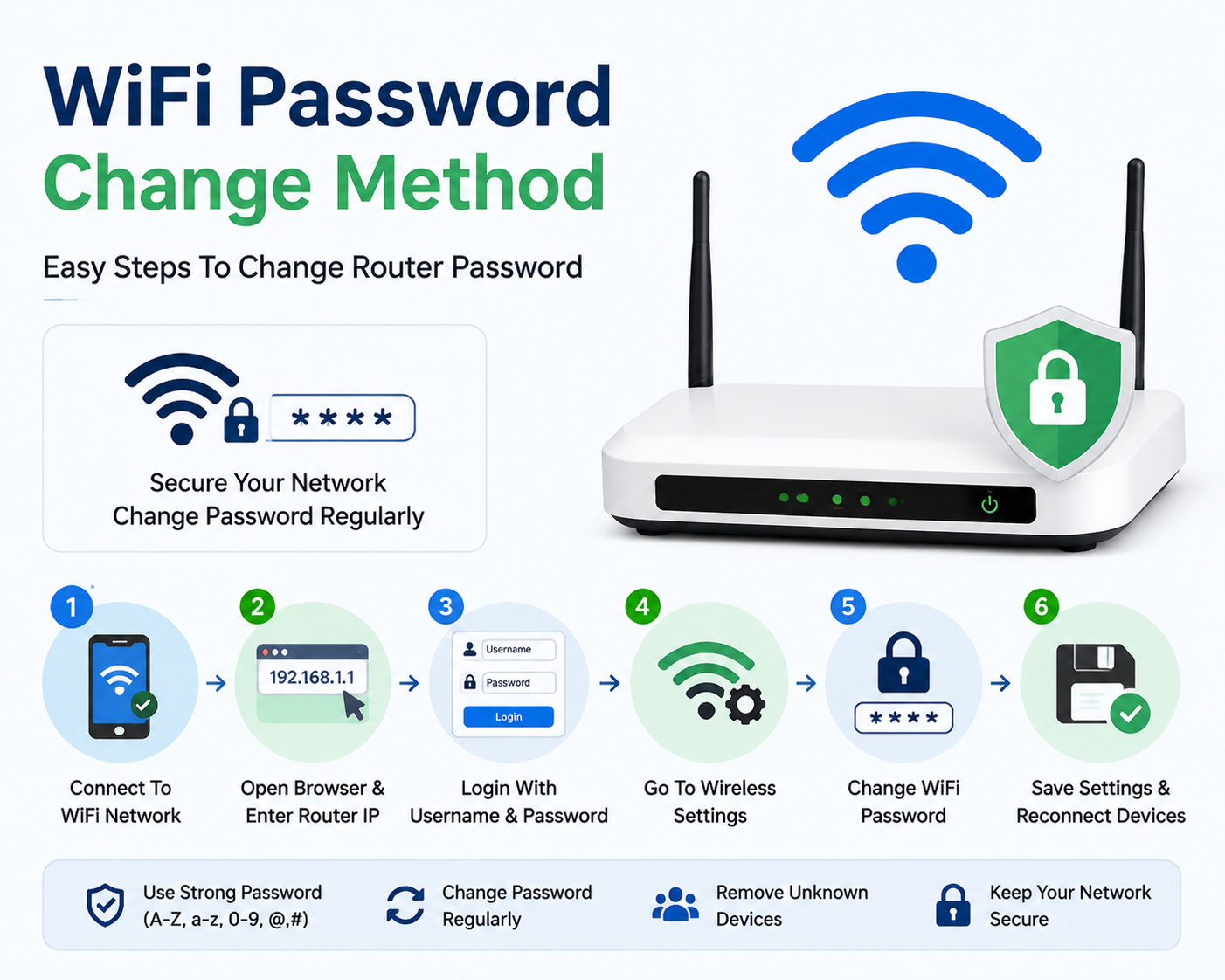
How to Change WiFi Password Easily in 2026 ke digital world me WiFi internet har ghar, office aur business ki zaroorat ban chuka hai. Hum smartphones, laptops, smart TVs, gaming devices aur security cameras ko internet se connect karne ke liye WiFi use karte hain.
Lekin agar aapka WiFi password bohat purana ho gaya hai, ya bohat se log aapka internet use kar rahe hain, to WiFi password change karna bohat zaroori ho jata hai.How to Change WiFi Password Easily in 2026
Aksar log sochte hain ke WiFi password change karna mushkil kaam hai, lekin asal me ye sirf kuch simple steps ka process hai.
Is complete guide me hum seekhenge:
WiFi password change kaise karein
Router settings me login kaise karein
Mobile se WiFi password change karna
Computer se password change karna
TP-Link router password change method
PTCL WiFi password change
Huawei aur ZTE router settings
Strong WiFi password kaise banayein
Password change ke baad devices reconnect kaise karein
WiFi Password Change Karna Kyun Zaroori Hai?How to Change WiFi Password Easily in 2026.
WiFi password sirf internet access ke liye nahi hota, balkay ye aapke network ki security ka important hissa hota hai.
Agar aap password change nahi karte to kuch problems aa sakti hain:
1. Unauthorized Users Internet Use Kar Sakte Hain
Agar kisi ko aapka WiFi password pata chal gaya hai to wo bina permission ke aapka internet use kar sakta hai.How to Change WiFi Password Easily in 2026
Is se:
Internet speed slow ho sakti hai
Data usage increase ho sakta hai
Online activities affect ho sakti hain
2. Better Internet Speed Ke Liye
Kabhi kabhi WiFi slow hone ki wajah ye hoti hai ke bohat zyada devices connected hoti hain.How to Change WiFi Password Easily in 2026
Password change karne ke baad sirf authorized devices hi connect hongi aur internet performance improve ho sakti hai.
3. Network Security Improve Karne Ke Liye
Purana password hackers ke liye risk create kar sakta hai.
Ek strong password:How to Change WiFi Password Easily in 2026
Network ko secure karta hai
Unknown users ko block karta hai
Personal data ko protect karta hai
WiFi Password Change Karne Se Pehle Ye Cheezen Check Karein
Password change karne se pehle kuch basic information ready rakhein:
1. Router IP Address
Aksar routers ka default IP hota hai:
192.168.1.1
192.168.0.1
192.168.8.1
Ye router ke brand ke hisaab se different ho sakta hai.
2. Router Username Aur Password
Router settings open karne ke liye login details chahiye hoti hain.
Common login:
Username:
admin
Password:
admin
Ya phir router ke neeche sticker par details likhi hoti hain.
Mobile Se WiFi Password Change Karne Ka Tarika
Aaj kal zyada tar users mobile se router settings access karte hain.
Follow karein:
Step 1: WiFi Se Connect Hon
Sab se pehle apne phone ko us WiFi network se connect karein jis ka password change karna hai.
Step 2: Browser Open Karein
Mobile me koi bhi browser open karein:
Chrome
Safari
Firefox
Address bar me likhein:
192.168.1.1
Ya:
192.168.0.1
Step 3: Router Login Page Open Karein
Ab router login page open hoga.
Yahan:
Username:
admin
Password:
admin
enter karein.
Agar login nahi hota to router ke backside sticker ko check karein.
Step 4: Wireless Settings Open Karein
Login ke baad:
Wireless Settings
ya
WiFi Settings
option par click karein.
Step 5: Password Change Karein
Ab option milega:
Wireless Password
WiFi Password
WPA Key
Security Key
Yahan apna naya password enter karein.
Example:
PunjabInternet@2026
Step 6: Save Button Press Karein
Save ya Apply button par click karein.How to Change WiFi Password Easily in 2026
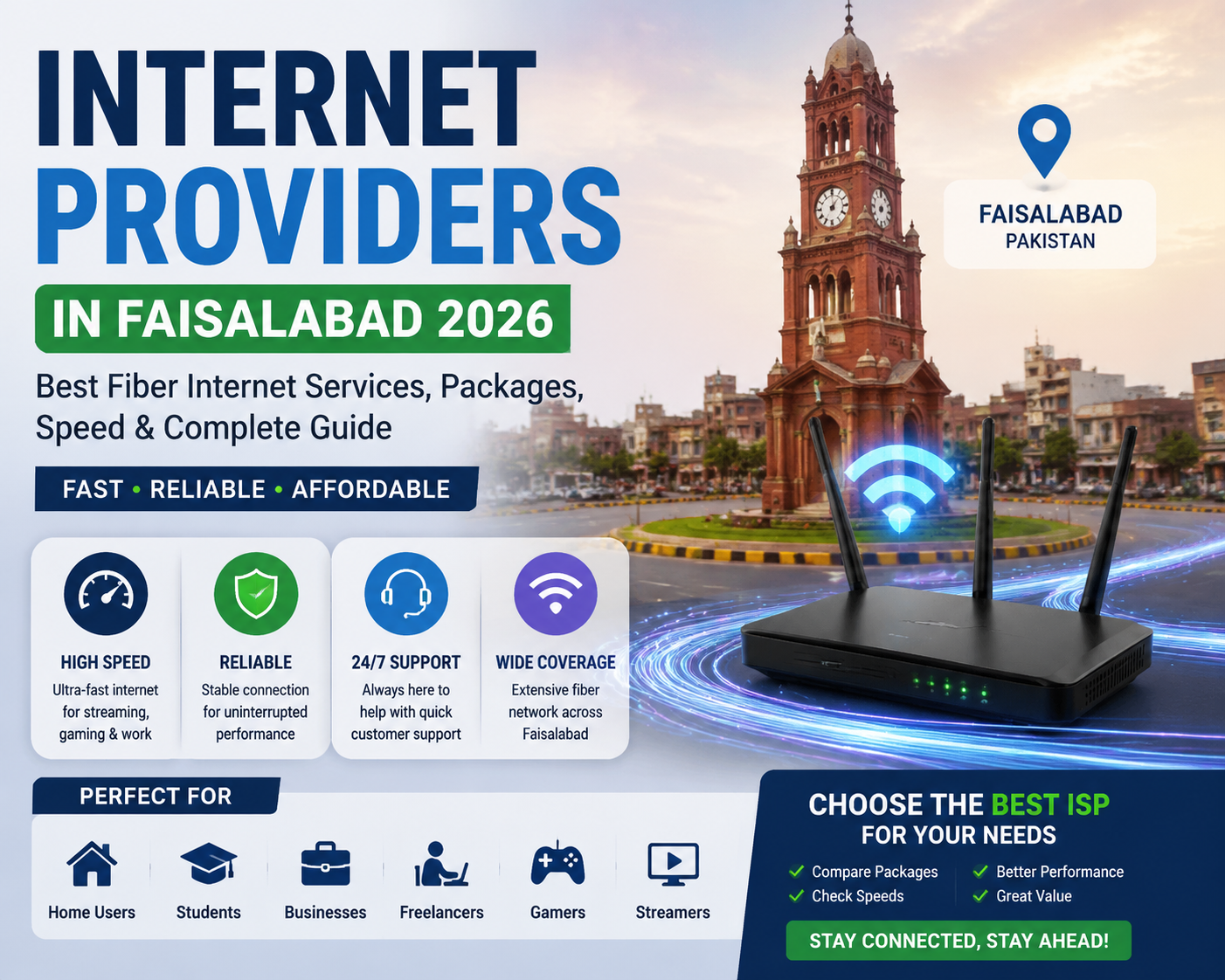
Best Internet Providers in Faisalabad 2026 , the demand for fast and reliable internet services in Faisalabad has increased significantly. Faisalabad is one of Pakistan’s largest industrial and commercial cities, known for its textile industry, businesses, educational institutions, freelancers, and growing digital.
Today, internet connectivity is no longer just a luxury. It has become an essential part of daily life. Students need stable internet for online learning, professionals depend on high-speed connections for remote jobs, businesses require reliable networks for operations, and families use the internet for entertainment, communication, and smart devices.
With the rapid growth of digital services, choosing the right Internet Provider in Faisalabad has become an important decision. A good ISP can provide faster speeds, better reliability, lower downtime, and excellent customerBest Internet Providers in Faisalabad 2026
This complete guide covers everything you need to know about the best internet providers in Faisalabad 2026, including fiber internet services, packages, speed options, benefits, and tips for selecting the right .
Why High-Speed Internet Is Important in Faisalabad 2026
The internet landscape in Faisalabad has changed dramatically over the past few years. Traditional broadband connections are slowly being replaced by modern fiber optic technology.Best Internet Providers in Faisalabad 2026
People now expect:
Faster download and upload speeds
Smooth video streaming
Reliable online meetings
Low-latency gaming
Better work-from-home performance
Stable business connectivity
Whether you are a student, freelancer, entrepreneur, gamer, or business owner, a reliable internet connection plays a major role in productivity.
The Rise of Fiber Internet in Faisalabad
Fiber optic internet has become one of the most popular choices among Faisalabad residents because it offers better performance compared to traditional internet technologies.Best Internet Providers in Faisalabad 2026
Fiber internet uses thin glass cables that transmit data using light signals. This technology allows faster speeds and more stable connections.
Faisalabad has several internet service providers offering broadband and fiber connectivity. The best choice depends on your location, budget, speed requirements, and service quality.
1. Nayatel Internet Faisalabad
Nayatel is one of Pakistan’s well-known fiber internet companies, providing high-quality broadband services in multiple cities.
✔ Fiber-to-the-home technology ✔ Stable internet performance ✔ Professional customer support ✔ Business internet solutions ✔ High-quality network infrastructure
The cheapest package is not always the best. A slightly higher price with better reliability can save money and frustration in the long run.
Internet Providers in Faisalabad 2026: Best Fiber Internet Packages, Speed, Coverage & Complete Comparison Guide (Part 2)
Internet Packages Comparison in Faisalabad 2026
Choosing the right internet package depends on your usage. A student who only browses websites does not need the same speed as a business owner who manages online operations.Best Internet Providers in Faisalabad 2026
In 2026, most users in Faisalabad prefer fiber internet packages because they provide better speed, stability, and performance compared to traditional connections. Fiber services are expanding in Faisalabad, with providers offering options for homes, offices, and enterprises.Best Internet Providers in Faisalabad 2026
Users who upload large files or work online usually prefer this speed.
100 Mbps or Higher Internet Package
High-speed packages are designed for heavy users.
Best For:
Software companies
Offices
Online businesses
Professional gamers
YouTubers
Large families
Some providers in Pakistan offer fiber packages reaching hundreds of Mbps depending on area availability.
Best Internet Provider for Home Users in Faisalabad 2026
For home users, the ideal ISP should provide:
✅ Stable connection ✅ Affordable monthly plans ✅ Good customer support ✅ Fast complaint resolution ✅ Reliable speed during peak hours
Popular choices include major fiber providers and local ISPs depending on your area coverage. Coverage availability can vary from one neighborhood to another, so checking your exact location before installation is important.
Best Internet Provider for Students in Faisalabad
Students require internet for:
Online classes
Research
Video lectures
Assignments
Freelancing skills
A good student package should offer:
Affordable monthly charges
Stable browsing
Enough speed for video calls
Recommended speed:
20 Mbps – 30 Mbps
This is usually enough for study purposes and multiple devices.
Best Internet Provider for Freelancers in Faisalabad
Faisalabad has a growing freelance community working on platforms like:
Upwork
Fiverr
Freelancer
Remote company jobs
Freelancers need more than just download speed.
Important features include:
High Upload Speed
Uploading:
Designs
Videos
Documents
Client files
requires strong upload performance.
Stable Video Calls
A weak connection during Zoom or Google Meet meetings can affect professional work.
Recommended speed:
50 Mbps or above
Best Internet for Gaming in Faisalabad
Online gaming requires:
Low ping
Stable connection
Minimum packet loss
Games like:
PUBG Mobile
Call of Duty
Valorant
Fortnite
need a reliable network.
Fiber internet is usually preferred by gamers because it provides better latency compared with older broadband technologies.
Business Internet Solutions in Faisalabad
Businesses require internet that works continuously.
Industries, offices, and companies need:
Fast communication
Cloud applications
CCTV monitoring
Online transactions
Customer management systems
A professional business connection should include:
✔ Dedicated support ✔ Better uptime ✔ Higher bandwidth ✔ Security features
Local fiber companies in Faisalabad also provide business-focused networking solutions for offices and enterprises.
Fiber Internet vs Wireless Internet in Faisalabad
Fiber Internet
Advantages:
✔ Faster speed ✔ Lower latency ✔ More stable connection ✔ Better for businesses ✔ Excellent for streaming
Disadvantages:
❌ Coverage depends on area ❌ Installation may take time
Wireless Internet
Advantages:
✔ Available in many locations ✔ Quick installation ✔ Useful where fiber is unavailable
Disadvantages:
❌ Weather can affect performance ❌ Speed may fluctuate ❌ Higher latency compared with fiber
For long-term use, fiber is generally the preferred option where available.
Factors to Consider Before Selecting an ISP
1. Area Coverage
Always check if the provider is available in your street or housing society.
A company may provide excellent service in one area but may not be available in another.
2. Customer Reviews
Before choosing an ISP:
Ask neighbors
Check local feedback
Test speed quality
Real user experience can help you make a better decision.
3. Installation Charges
Different providers have different installation policies.
Always ask about:
Router charges
Installation fees
Monthly billing
Maintenance costs
4. Customer Support
A good ISP should provide:
Quick response
Technical help
Complaint tracking
Professional support
Future of Internet Services in Faisalabad 2026 and Beyond
The future of internet connectivity in Faisalabad looks promising.
With the growth of:
Artificial Intelligence
Online businesses
Remote jobs
Smart homes
Digital education
E-commerce
the demand for faster internet will continue increasing.
Fiber networks will likely expand further, providing better connectivity for residential and commercial users.
The city’s growing digital economy means reliable internet will become even more important for businesses and individuals.
Internet Providers in Faisalabad 2026: Best Fiber Internet Services, Packages, Speed & Complete Guide (Part 3)
Top Internet Providers in Faisalabad 2026
Faisalabad has become one of the fastest-growing digital cities in Pakistan. With increasing demand for online education, freelancing, businesses, streaming, gaming, and smart technology, internet service providers are continuously improving their networks.
Choosing the right ISP depends on:
Your location
Required speed
Monthly budget
Customer support quality
Connection reliability
Below are some important categories of internet providers available for Faisalabad users.
1. Premium Fiber Internet Providers
Premium fiber providers focus on quality, speed, and reliable service.
These providers are suitable for:
Business users
Freelancers
Remote workers
Professional users
Families requiring stable internet
Features of Premium Fiber Services:
✔ High-speed fiber connection ✔ Better network stability ✔ Professional technical support ✔ Suitable for heavy internet usage ✔ Better streaming and gaming experience
2. Local Fiber Internet Providers in Faisalabad
Local internet providers play an important role in Faisalabad because they often provide services in specific neighborhoods where large companies may not have complete coverage.
Advantages of Local ISPs:
Fast Installation
Local teams can often install connections quickly because they operate within nearby areas.
Affordable Packages
Many local providers offer budget-friendly plans for:
Students
Home users
Small offices
Local Customer Support
Customers can often communicate directly with local technical teams.
Internet Provider Comparison: What Matters Most?
When comparing different ISPs in Faisalabad, users should focus on quality instead of only price.
Feature
Importance
Internet Speed
Very High
Connection Stability
Very High
Customer Support
High
Price
Medium
Coverage
Very High
Upload Speed
High
Ping/Latency
Important for Gaming
Cheapest Internet Packages in Faisalabad 2026
Many users search for affordable internet packages that provide good value.
A budget-friendly internet connection should provide:
Reasonable monthly cost
Stable speed
Good customer service
Enough bandwidth for daily needs
Budget Users
Recommended Speed:
10 Mbps – 20 Mbps
Best for:
Browsing
Social media
Online classes
Basic streaming
Average Home Users
Recommended Speed:
30 Mbps – 50 Mbps
Best for:
Families
Smart TVs
Multiple devices
Online meetings
Entertainment
Professional Users
Recommended Speed:
100 Mbps or higher
Best for:
Online businesses
Software development
Video production
Large file transfers
Multiple employees
Common Internet Problems in Faisalabad and Their Solutions
Even with modern fiber networks, users may face some technical issues.
1. Slow Internet Speed
Possible Reasons:
Too many connected devices
Router problems
Network congestion
Weak Wi-Fi signals
Solutions:
✔ Restart your router ✔ Check connected devices ✔ Use a better Wi-Fi router ✔ Contact your ISP for line checking
2. Internet Disconnection Problems
Frequent disconnections can happen because of:
Cable issues
Router faults
Maintenance work
Power problems
A reliable ISP should provide quick technical support.
3. Weak Wi-Fi Coverage
Sometimes the internet package is fast, but Wi-Fi performance is poor.
Solutions:
Place router in a central location
Avoid walls and obstacles
Upgrade your router
Use Wi-Fi extenders if needed
How Much Internet Speed Do You Actually Need?
Many people purchase expensive packages without understanding their requirements.
Here is a simple guide:
Single User
20 Mbps is usually enough.
Suitable for:
Browsing
Social media
Online learning
Streaming
Small Family
30–50 Mbps is recommended.
Suitable for:
Multiple smartphones
Smart TV
Video calls
Online work
Large Family or Office
100 Mbps or more is better.
Suitable for:
Many connected devices
Business operations
Heavy downloads
Why Faisalabad Businesses Need Better Internet in 2026
Businesses are becoming more dependent on digital technology.
Modern companies use internet for:
Online payments
Customer communication
Cloud software
Digital marketing
Video meetings
Data management
A slow connection can reduce productivity and create financial losses.
For this reason, businesses should choose internet providers that offer:
✔ Reliable uptime ✔ Business support ✔ Dedicated solutions ✔ Faster repair services
Internet and Digital Growth in Faisalabad
Faisalabad is not only an industrial city anymore. It is also becoming a digital working hub.
The growth of:
Freelancing
E-commerce
Online education
Remote jobs
Technology services
has increased the importance of fast internet.
Young professionals are using internet connections to build online careers and international businesses.
Tips to Improve Your Internet Experience
Use a Quality Router
A good router improves:
Speed
Range
Stability
Secure Your Wi-Fi Network
Always:
Use a strong password
Change default router settings
Avoid sharing Wi-Fi unnecessarily
Regularly Test Your Internet Speed
Speed tests help identify:
Actual speed
Ping
Upload performance
If your speed is consistently lower than your package, contact your provider.
Final Thoughts: Choosing the Best Internet Provider in Faisalabad 2026
Finding the best Internet Provider in Faisalabad 2026 depends on your personal needs.
There is no single ISP that is perfect for everyone. The best choice is the provider that offers:
✅ Reliable connection ✅ Good coverage in your area ✅ Affordable pricing ✅ Fast customer support ✅ Suitable speed for your usage
For students, affordable fiber packages are usually enough. Freelancers and professionals should focus on upload speed and stability. Businesses should choose reliable solutions with strong support.
As Faisalabad continues moving toward a digital future, high-quality internet services will become even more important for education, business, entertainment, and everyday life.
Frequently Asked Questions (FAQ)
1. Which is the best internet provider in Faisalabad 2026?
The best internet provider depends on your area, requirements, and available coverage. Fiber internet providers are generally preferred because of better speed and stability.
2. Which internet is best for home use in Faisalabad?
For most homes, a 30 Mbps to 50 Mbps fiber connection provides a good balance between speed and affordability.
3. Is fiber internet available in Faisalabad?
Yes, fiber internet services are available in many areas of Faisalabad, but coverage depends on the specific location.
4. What internet speed is best for online work?
Freelancers and remote workers usually benefit from 50 Mbps or higher connections with good upload speed.
5. Is fiber internet better than wireless internet?
Yes, fiber internet generally provides faster speed, lower latency, and better stability compared with wireless connections.
6. How can I check the best ISP near my area?
You can ask nearby users, check provider coverage maps, and compare customer reviews before selecting an ISP.
Introduction: Why WiFi Speed Matters More Than Ever in 2026
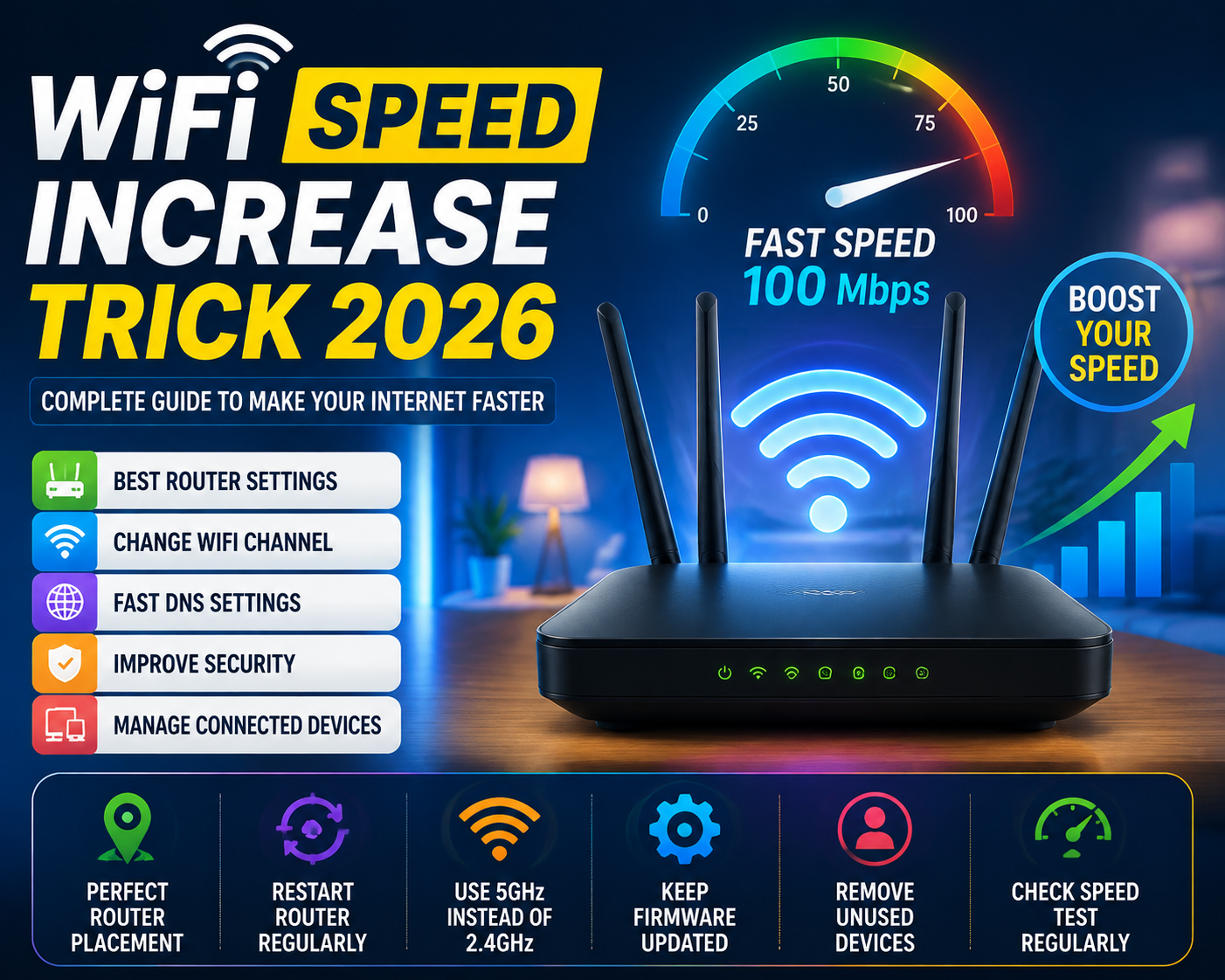
Best WiFi Speed Increase Trick 2026 Aaj ke digital zamane me fast internet sirf ek luxury nahi raha, balkay har ghar aur business ki zaroorat ban chuka hai. 2026 me online classes, remote work, video streaming, cloud services, AI tools, gaming aur smart devices ki wajah se WiFi speed ka important role hai.
Bohat se users ke paas high-speed internet package hota hai, lekin phir bhi unka WiFi slow chalta hai. Video buffering karti hai, websites late open hoti hain, online games me lag aata hai aur video calls disconnect ho jati hain.
Is problem ka matlab hamesha ye nahi hota ke aap ka internet provider slow hai. Aksar masla router settings, WiFi signal, network interference ya wrong configuration ki wajah se hota hai.
Is complete guide me hum WiFi Speed Increase Trick 2026 ke advanced aur simple methods share karenge jin ki madad se aap apne home WiFi ko zyada fast, stable aur reliable bana sakte hain.Best WiFi Speed Increase Trick 2026
What Is WiFi Speed and How Does It Work?
WiFi speed se murad wo speed hai jis se data aap ke router aur connected devices ke darmiyan transfer hota hai.Best WiFi Speed Increase Trick 2026
Jab aap mobile, laptop ya smart TV ko WiFi se connect karte hain to:
Internet signal ISP se aap ke router tak aata hai.
Router is signal ko wireless network me convert karta hai.
Aap ke devices WiFi waves ke zariye data receive karte hain.
WiFi ki actual speed kai factors par depend karti hai:
Router quality
Internet package speed
WiFi frequency
Distance from router
Connected devices ki quantity
Network interference
Router placement
Agar in me se koi bhi cheez properly optimized na ho to fast internet package hone ke bawajood speed kam mil sakti hai.Best WiFi Speed Increase Trick 2026
Why Is My WiFi Slow Even With Fast Internet?
Ye 2026 me sab se common internet problem hai. Users aksar kehte hain:
“Internet package 100 Mbps hai lekin WiFi sirf 20 Mbps speed deta hai.”Best WiFi Speed Increase Trick 2026
Is ki kuch common wajahain ye hain:
1. Router Ki Wrong Placement
Router ko ghar ke kisi kone, cupboard ya zameen ke qareeb rakhna signal ko weak kar deta hai.Best WiFi Speed Increase Trick 2026
Behtar hai ke router:Best WiFi Speed Increase Trick 2026
Ghar ke center me ho
Open area me rakha ho
Zameen se thora upar ho
Electronic devices se door ho
Microwave oven, Bluetooth devices aur kuch wireless equipment WiFi signals ko disturb kar sakte hain.Best WiFi Speed Increase Trick 2026
2. Too Many Connected Devices
Aaj kal ghar me bohat se smart devices connected hote hain:
Smartphones
Smart TV
CCTV cameras
Tablets
Gaming consoles
Smart speakers
Jitne zyada devices network use karenge, utni bandwidth divide hogi.
Agar ek hi WiFi par bohat zyada devices active hain to speed naturally slow ho sakti hai.Best WiFi Speed Increase Trick 2026
3. Old Router Technology
Purane routers aksar new internet speeds handle nahi kar pate.
2026 me modern routers me ye technologies important hain:
WiFi 6
WiFi 6E
WiFi 7
Better antennas
Improved security
Faster processing
Agar aap ka router bohat purana hai to upgrade karna speed improvement ka acha tareeqa ho sakta hai.Best WiFi Speed Increase Trick 2026
First WiFi Speed Increase Trick: Restart Your Router Regularly
Sab se simple aur effective trick router restart karna hai.
Haftay me ek dafa router restart karna useful ho sakta hai.
Second Trick: Use 5GHz WiFi Band Instead of 2.4GHz
Modern routers aksar do frequency bands provide karte hain:
2.4GHz WiFi Best WiFi Speed Increase Trick 2026
Advantages:
Zyada range
Walls cross karne ki better ability
Disadvantages:
Speed kam hoti hai
Interference zyada hota hai
5GHz WiFi
Advantages:
Faster speed
Less interference
Gaming aur streaming ke liye better
Disadvantages:
Range kam hoti hai
Agar aap router ke qareeb hain to 5GHz network use karna WiFi speed improve kar sakta hai.Best WiFi Speed Increase Trick 2026
Third Trick: Change WiFi Channel Settings
WiFi channels wireless traffic ke liye use hote hain.
Agar aap ke area me bohat se routers same channel use kar rahe hon to interference create hoti hai.Best WiFi Speed Increase Trick 2026
Is problem ka solution:Best WiFi Speed Increase Trick 2026
Router admin panel open karein
WiFi settings me jayein
Channel ko Auto ya less crowded channel par set karein
Common channels:Best WiFi Speed Increase Trick 2026
2.4GHz:
Channel 1
Channel 6
Channel 11
5GHz:
Multiple available channels
Proper channel selection se connection zyada stable ho sakta hai.Best WiFi Speed Increase Trick 2026
WiFi Speed Increase Trick 2026: Complete Guide to Make Your Internet Faster
Part 2: Advanced Router Settings & WiFi Optimization Methods
Best Router Settings for Maximum WiFi Speed in 2026
Aksar log naya internet package lagwa lete hain lekin router ki settings ko optimize nahi karte. Router ki correct configuration WiFi performance ko kaafi improve kar sakti hai.Best WiFi Speed Increase Trick 2026
Agar aap ka router properly configured nahi hai to:Best WiFi Speed Increase Trick 2026
Internet speed kam mil sakti hai
Connection bar bar disconnect ho sakta hai
Gaming me lag aa sakta hai
Video streaming buffer kar sakti hai
2026 me better WiFi experience ke liye router settings ko optimize karna bohat zaroori hai.Best WiFi Speed Increase Trick 2026
1. Router Firmware Update Karein
Router ka firmware us ka operating system hota hai jo us ki performance control karta hai.Best WiFi Speed Increase Trick 2026
Purana firmware hone ki wajah se:
Speed issues aa sakte hain
Security problems ho sakti hain
New devices ke sath compatibility problem ho sakti hai
Firmware Update Karne Ka Tarika:
Browser open karein
Router IP address enter karein (Example: 192.168.1.1 ya 192.168.0.1)
Admin panel me login karein
Firmware Update section open karein
Latest version install karein
Note: Update ke waqt router ko off na karein.Best WiFi Speed Increase Trick 2026
2. WiFi Network Name (SSID) Optimize Karein
SSID aap ke WiFi network ka naam hota hai.Best WiFi Speed Increase Trick 2026
Aksar users default naam use karte hain jo router company deti hai.
Agar WPA3 available nahi hai to WPA2-AES bhi secure option hai.
5. Quality of Service (QoS) Enable Karein
QoS router ka advanced feature hai jo internet traffic ko priority deta hai.Best WiFi Speed Increase Trick 2026.
Example:
Agar ghar me:
Ek banda online gaming kar raha hai
Doosra Netflix dekh raha hai
Teesra video call kar raha hai
To QoS gaming ya important device ko priority de sakta hai.
QoS Benefits:
Gaming lag kam hota hai
Video calls stable hoti hain
Important devices ko better speed milti hai
How to Increase WiFi Signal Range at Home
WiFi speed sirf internet package par depend nahi karti. Signal strength bhi bohat important hai.Best WiFi Speed Increase Trick 2026.
Agar signal weak hai to speed automatically reduce ho jati hai.
Router Placement Rules for Better WiFi
Router ko:Best WiFi Speed Increase Trick 2026.
✅ Ghar ke center me rakhein ✅ Open jagah par rakhein ✅ Table ya shelf par rakhein ✅ Antenna ko vertical position me rakhein
Router ko in jagahon par na rakhein:
❌ Closed cupboard ❌ Floor ke neeche ❌ Thick walls ke peeche ❌ Microwave ke qareeb
Use WiFi Extender or Mesh System
Agar ghar bara hai aur signal har jagah nahi pohanchta to WiFi extender ya mesh WiFi system helpful ho sakta hai.
WiFi Extender
Benefits:
Coverage increase karta hai
Affordable option hai
Mesh WiFi System
Benefits:
Better coverage
Stable connection
Multiple rooms ke liye suitable
2026 me large homes ke liye mesh networking popular solution hai.
Remove Unused Connected Devices
Kabhi kabhi purane devices background me internet use karte rehte hain.Best WiFi Speed Increase Trick 2026.
Check karein:Best WiFi Speed Increase Trick 2026.
Router admin panel open karein
Connected devices list dekhein
Unknown devices remove karein
Is se:
Bandwidth free hoti hai
Security improve hoti hai
Speed better hoti hai
Clear Router Cache and Reconnect Devices
Kuch cases me device ka network cache problem create karta hai.
Simple solution:
WiFi disconnect karein
Device restart karein
Dobara WiFi connect karein
Ye method mobile, laptop aur smart TV par kaam kar sakta hai.
WiFi Speed Test Ka Sahi Tarika
Speed test karte waqt kuch cheezon ka khayal rakhein:
Router ke qareeb test karein
Background downloads band karein
Multiple devices disconnect karein
Different times par test karein
Popular measurements:
Download Speed
Upload Speed
Ping
Jitter
Gaming ke liye ping bohat important hota hai.
WiFi Speed Increase Trick 2026: Complete Guide to Make Your Internet Faster
Part 3: Advanced Speed Optimization, DNS Settings & Gaming WiFi Guide
How to Change DNS Settings for Faster Internet in 2026
DNS (Domain Name System) internet ka ek important part hai. Jab aap kisi website ka naam likhte hain, jaise Google.com, to DNS us naam ko IP address me convert karta hai taa ke browser website open kar sake.
Agar DNS server slow ho to:
Websites late open hoti hain
Browsing slow feel hoti hai
Connection response time increase ho sakta hai
Fast DNS use karne se browsing experience improve ho sakta hai.
Best Free DNS Servers for Better Internet Performance
2026 me kuch popular DNS services ye hain:
DNS Provider
Primary DNS
Secondary DNS
Cloudflare DNS
1.1.1.1
1.0.0.1
Google DNS
8.8.8.8
8.8.4.4
Quad9 DNS
9.9.9.9
149.112.112.112
DNS change karne ke baad websites ka response time kuch cases me improve ho sakta hai.
How to Change DNS on Router
Router level par DNS change karne ka faida ye hai ke ghar ke tamam devices automatically new DNS use karte hain.
Steps:
Browser open karein
Router IP type karein Example: 192.168.1.1
Admin panel me login karein
Internet/WAN Settings open karein
DNS Settings me jayein
New DNS enter karein
Save karke router restart karein
Best WiFi Settings for Gaming in 2026
Online gaming me sirf high speed important nahi hoti. Low ping aur stable connection zyada important hota hai.
Gaming ke liye:
5GHz WiFi use karein
Router ke qareeb beth kar game khelein
Background downloads band karein
QoS enable karein
Ethernet cable use kar sakte hain agar possible ho
How to Reduce WiFi Lag While Gaming
Gaming lag ki common wajahain:
High ping
Weak signal
Network congestion
Background applications
Solutions:
1. Close Background Apps
Mobile ya PC par:
Cloud backup
Downloads
Updates
band kar dein.
2. Use Gaming Priority Settings
Agar router me QoS ya Gaming Mode available hai to enable karein.
Ye gaming traffic ko priority de sakta hai.
3. Choose Better WiFi Band
Gaming ke liye:
5GHz WiFi:
Fast speed
Low interference
Better performance
Lekin agar distance zyada hai to 2.4GHz better range de sakta hai.
How to Fix WiFi Buffering Problems While Streaming
Netflix, YouTube aur live streaming ke waqt buffering ka issue aksar WiFi optimization se solve ho sakta hai.
Streaming ke liye Tips:
Smart TV ko 5GHz network par connect karein
Router ko TV ke qareeb rakhein
Extra devices disconnect karein
Internet speed check karein
Recommended speed:
Activity
Recommended Speed
HD Video
5-10 Mbps
Full HD Streaming
10-20 Mbps
4K Streaming
25+ Mbps
Multiple 4K Devices
50+ Mbps
Fiber Internet Speed Optimization Guide 2026
Fiber internet normally bohat fast hota hai, lekin WiFi ki wajah se speed kam lag sakti hai.
Fiber users ke liye:
1. Gigabit Router Use Karein
Agar aap ke paas 100 Mbps ya us se zyada package hai to router ko bhi high-speed support karna chahiye.
Features:
Gigabit Ethernet Ports
WiFi 6 Support
Better antennas
2. Correct Network Cable Use Karein
Router aur ONT ke darmiyan achi quality cable use karein.
Recommended:
Cat5e
Cat6
Cat6A
Old cables speed limit kar sakti hain.
WiFi 6 and WiFi 7: Future of Faster Wireless Internet
2026 me WiFi technology bohat advance ho chuki hai.
WiFi 6 Benefits:
More connected devices support
Better efficiency
Improved speed
WiFi 7 Benefits:
Extremely high speed
Lower latency
Better performance for advanced applications
Smart homes, gaming aur AI devices ke liye new WiFi standards important ban rahe hain.
Advanced Router Configuration Tips
Agar aap expert level performance chahte hain to ye settings check karein:
Disable Unused Features
Agar zaroorat nahi:
Guest network
Extra services
Old protocols
disable kar sakte hain.
Enable Automatic Updates
Router ko updated rakhna:
Security improve karta hai
Performance better karta hai
Monitor Network Usage
Router ke dashboard se check karein:
Kaunsa device zyada data use kar raha hai
Unknown users connected hain ya nahi
Network load kitna hai
Common WiFi Problems and Quick Solutions
Problem
Solution
WiFi slow hai
Router restart karein
Signal weak hai
Router location change karein
Gaming lag
5GHz use karein
Video buffering
Extra devices disconnect karein
Connection drop
Firmware update karein
Slow browsing
DNS change karen
WiFi Speed Increase Trick 2026: Complete Guide to Make Your Internet Faster
Part 4: Mobile, Laptop & Router Optimization Guide
WiFi Speed Increase Tricks for Mobile Devices in 2026
Aaj kal zyada tar log internet mobile par use karte hain. Agar phone me WiFi slow chal raha ho to aksar masla internet package ka nahi hota balkay mobile settings ya network configuration ka hota hai.
Android aur iPhone users kuch simple tricks follow karke WiFi performance improve kar sakte hain.
1. Mobile WiFi Settings Optimize Karein
Apne phone ki WiFi settings check karein.
Android Users:
Settings open karein
WiFi section me jayein
Connected network select karein
Network details check karein
Ensure karein:
Signal strong ho
Correct WiFi band connected ho
Battery saving mode WiFi ko restrict na kar raha ho
2. Forget and Reconnect WiFi Network
Kabhi kabhi purani network settings ki wajah se connection slow ho jata hai.
Solution:
WiFi settings open karein
Apna network select karein
Forget Network par click karein
Dobara password enter karke connect karein
Is se:
Connection refresh hota hai
Authentication errors solve ho sakte hain
3. Disable Background Data Usage
Mobile apps background me internet use karti rehti hain.
Examples:
Social media apps
Cloud backup
Automatic updates
Video apps
Background usage kam karne se available bandwidth improve ho sakti hai.
4. Update Mobile Software
Purana operating system kabhi kabhi WiFi performance issues create kar sakta hai.
Regularly:
Android update check karein
iOS update install karein
Network settings update rakhein
iPhone WiFi Speed Improve Tips
iPhone users ke liye:
Disable WiFi Assist (If Needed)
WiFi Assist weak WiFi par mobile data use kar sakta hai.
Settings:
Settings → Mobile Data → WiFi Assist
Agar zaroorat nahi to disable kar sakte hain.
Reset Network Settings
Agar WiFi bar bar disconnect hota hai:
Settings → General → Transfer or Reset iPhone → Reset Network Settings
Note: Is se saved WiFi passwords remove ho jayenge.
Laptop WiFi Speed Increase Methods 2026
Laptop me slow WiFi ki wajah:
Old WiFi adapter
Driver problems
Background applications
Power settings
ho sakti hain.
1. Update WiFi Drivers
Laptop ka WiFi driver updated hona chahiye.
Steps:
Device Manager open karein
Network Adapters par jayein
WiFi adapter select karein
Update Driver choose karein
Updated drivers:
Better stability dete hain
New routers ke sath compatibility improve karte hain
2. Change Laptop Power Settings
Kabhi kabhi power saving mode WiFi performance reduce kar deta hai.
Windows me:
Control Panel → Power Options → High Performance
select kar sakte hain.
3. Use External WiFi Adapter
Agar laptop ka built-in WiFi weak hai to external USB WiFi adapter performance improve kar sakta hai.
Modern adapters:
WiFi 6 support
Better antennas
Faster speeds
provide karte hain.
Best WiFi Router Features to Look For in 2026
Agar aap naya router purchase karne ka soch rahe hain to sirf speed number nahi dekhein.
Important features:
1. WiFi 6 Support
WiFi 6 routers:
Zyada devices handle karte hain
Better efficiency dete hain
Busy networks me achi performance dete hain
2. Gigabit Ethernet Ports
High-speed fiber users ke liye:
Gigabit WAN port
Gigabit LAN ports
bohat important hain.
3. Multiple Antennas
Achi antenna design:
Better coverage
Stronger signals
Improved stability
provide karti hai.
4. MU-MIMO Technology
MU-MIMO technology multiple devices ko efficiently data provide karti hai.
Benefits:
Multiple users ke liye better speed
Smart home devices ke liye useful
How Many Mbps WiFi Speed Do You Really Need?
Internet requirement aap ke usage par depend karti hai.
User Type
Recommended Speed
Basic Browsing
10-25 Mbps
Students & Online Classes
25-50 Mbps
Streaming Family
50-100 Mbps
Gaming Users
50+ Mbps
Offices
100+ Mbps
WiFi Security Tips to Protect Your Speed
Security ka direct relation WiFi performance se bhi hota hai.
How to Earn Money Using AI Tools 2026 Artificial Intelligence (AI) has completely changed the way people work, learn, and earn money online. In 2026, AI is not only a technology for big companies but also a powerful opportunity for students, freelancers, bloggers, designers, and small business owners in Pakistan.How to Earn Money Using AI Tools 2026
Many people think that earning money with AI requires advanced programming skills, but this is not true. Today, anyone with basic computer knowledge and internet access can use AI tools to create content, design graphics, provide services, automate tasks, and build online businesses.
Pakistan has a growing freelancing community, and AI tools are helping beginners work faster and compete globally. From writing articles to creating videos, designing logos, managing social media, and developing websites, AI has opened many new income opportunities.
In this complete guide, you will learn how to earn money using AI tools in Pakistan, which AI tools are useful, what skills you need, and how beginners can start earning online.
What Are AI Tools and How Do They Help You Earn Money?
AI tools are software applications that use artificial intelligence technology to complete tasks that normally require human intelligence.
These tools can help with:How to Earn Money Using AI Tools 2026
Writing and editing content
Creating images and graphics
Making videos
Translating languages
Automating business tasks
Analyzing data
Creating marketing campaigns
Improving productivity
Instead of spending many hours completing a task manually, AI tools can reduce your working time and help you deliver better results.
For example:How to Earn Money Using AI Tools 2026
A content writer who writes one article in a day can use AI tools to research topics, create outlines, improve grammar, and complete multiple articles faster.How to Earn Money Using AI Tools 2026
A designer can use AI image tools to create professional designs without spending years learning advanced software.How to Earn Money Using AI Tools 2026
Why AI Is a Great Opportunity for Pakistanis in 2026
Pakistan has millions of young people looking for online earning opportunities. AI provides new ways to earn without requiring a traditional job.How to Earn Money Using AI Tools 2026
1. Low Investment Required
Most AI tools have free versions. Beginners can start learning without spending a large amount of money.How to Earn Money Using AI Tools 2026
You mainly need:How to Earn Money Using AI Tools 2026
Internet connection
Laptop or smartphone
Basic skills
Learning attitude
2. Global Client Opportunities
Using AI skills, Pakistani freelancers can work with international clients from:How to Earn Money Using AI Tools 2026
United States
United Kingdom
Canada
Europe
Middle East
3. High Demand Skills
Companies are looking for people who can use AI to:How to Earn Money Using AI Tools 2026
Save time
Create content
Improve business processes
Increase productivity
Best Ways to Earn Money Using AI Tools in Pakistan
1. AI Content Writing and Blogging
Content writing is one of the easiest ways to start earning with AI tools.
Many websites need:How to Earn Money Using AI Tools 2026
Blog articles
Product descriptions
Website content
Social media posts
Email newsletters
AI tools can help you:
Find topics
Create article outlines
Improve grammar
Generate ideas
Optimize SEO
However, human editing is important because quality and originality matter.How to Earn Money Using AI Tools 2026
How to Start:
Step 1: Learn basic SEO writing.How to Earn Money Using AI Tools 2026
Step 2: Practice creating articles with AI assistance.How to Earn Money Using AI Tools 2026
Step 3: Create a portfolio website.How to Earn Money Using AI Tools 2026
Step 4: Offer services on freelancing platforms.How to Earn Money Using AI Tools 2026
Popular platforms:
Fiverr
Upwork
Freelancer
2. AI Graphic Design Services
You can earn money by creating:How to Earn Money Using AI Tools 2026
YouTube thumbnails
Business logos
Social media posts
Advertisements
Website banners
AI design tools allow beginners to create professional-looking designs quickly.How to Earn Money Using AI Tools 2026
Services you can sell:How to Earn Money Using AI Tools 2026
Facebook post design
Instagram marketing graphics
Company branding packages
Presentation designs
Small businesses often need affordable designers, creating opportunities for beginners.How to Earn Money Using AI Tools 2026
3. AI Video Creation and YouTube Automation
Video content is growing rapidly.How to Earn Money Using AI Tools 2026 Many creators need help with:
Video scripts
Voice generation
Video editing
Thumbnail creation
AI tools can help create:
Educational videos
News videos
Short videos
Marketing videos
You can provide video creation services or build your own YouTube channel.How to Earn Money Using AI Tools 2026
How to Earn Money Using AI Tools in Pakistan 2026: Complete Beginner’s Guide
Focus Keyword: How to Earn Money Using AI Tools Pakistan Secondary Keywords:How to Earn Money Using AI Tools 2026
AI tools for earning money in Pakistan
Make money with AI in Pakistan
Best AI tools for freelancers in Pakistan
AI freelancing skills 2026
Online earning with AI tools
How to Earn Money Using AI Tools in Pakistan 2026
Introduction: AI Has Changed the Future of Online Earning
Artificial Intelligence (AI) is no longer just a technology used by large companies and software developers. In 2026, AI has become one of the biggest opportunities for students, freelancers, bloggers, designers, and small business owners who want to earn money online.
Pakistan has a large number of talented young people who are searching for online income opportunities. With the help of AI tools, many tasks that previously required years of experience can now be completed faster and more efficiently.How to Earn Money Using AI Tools 2026
From writing professional articles to creating graphics, editing videos, building websites, managing social media pages, and providing digital services to international clients, AI has opened new doors for online earning.How to Earn Money Using AI Tools 2026
The best thing about AI is that beginners can start learning without a huge investment. A laptop, internet connection, basic skills, and dedication are enough to begin.How to Earn Money Using AI Tools 2026
This guide explains how to earn money using AI tools in Pakistan, the best AI income methods, useful tools, required skills, and step-by-step strategies for beginners.How to Earn Money Using AI Tools 2026
What Are AI Tools?
AI tools are software applications that use artificial intelligence technology to perform tasks that normally require human thinking and creativity.How to Earn Money Using AI Tools 2026
These tools can understand information, generate content, analyze data, create designs, and automate repetitive work.How to Earn Money Using AI Tools 2026
Some common examples of AI-powered tasks include:How to Earn Money Using AI Tools 2026
Writing articles and blog posts
Creating images and graphics
Generating video content
Editing photos and videos
Translating languages
Creating marketing campaigns
Writing code
Managing customer support
For example, a writer can use AI to research topics and improve writing quality. A designer can create professional graphics in minutes. A business owner can automate daily tasks.How to Earn Money Using AI Tools 2026
AI does not replace human skills; instead, it helps people work faster and provide better services.How to Earn Money Using AI Tools 2026
Why AI Tools Are a Great Opportunity in Pakistan
1. Growing Freelancing Market
Pakistan is one of the fastest-growing freelancing markets in the world. Thousands of Pakistanis earn online by providing services to international clients.How to Earn Money Using AI Tools 2026
AI skills are becoming highly valuable because businesses want people who can:How to Earn Money Using AI Tools 2026
Save time
Reduce costs
Increase productivity
Create better content
A freelancer who understands AI tools can often complete work faster than someone using traditional methods.How to Earn Money Using AI Tools 2026
2. Low Investment Business Opportunity
Starting a traditional business usually requires a large investment, but AI-based online work can start with very little money.
You mainly need:
Internet connection
Computer or smartphone
Basic English communication
Learning skills
Many AI tools offer free plans, making them accessible for beginners.
3. International Earning Potential
AI skills allow Pakistani freelancers to work with clients worldwide.
You can provide services to:
USA businesses
UK companies
Canadian startups
European clients
Middle East businesses
International clients often pay better rates compared to local markets.
Best Ways to Earn Money Using AI Tools in Pakistan
1. AI Content Writing and Blogging
Content writing is one of the easiest ways to start earning with AI tools.
Millions of websites need fresh content every day, including:
Blog articles
Product descriptions
Website pages
Social media captions
Email newsletters
Marketing content
AI tools can help writers with:
Topic research
Content outlines
Grammar improvement
SEO optimization
Idea generation
However, successful writers do not simply copy AI-generated content. They add personal experience, research, examples, and human creativity.
How to Start AI Content Writing:
Step 1: Learn SEO Basics
Understand:
Keywords
Search intent
Headings structure
Internal linking
Meta descriptions
Step 2: Practice Writing
Create sample articles about different topics.
Examples:
Technology
Internet services
AI tools
Business
Education
Step 3: Build Portfolio
Create a simple website or upload samples on platforms like LinkedIn and freelancing websites.
Step 4: Find Clients
Offer services such as:
SEO blog writing
AI-assisted content creation
Website copywriting
2. AI Graphic Design Services
Graphic design is another profitable field where AI tools can help beginners.
Many businesses need:
Logo designs
Social media posts
YouTube thumbnails
Advertising banners
Business cards
Presentations
AI design tools allow you to create professional designs quickly.
You can sell these services to:
Small businesses
YouTubers
Online stores
Bloggers
Local companies
Example Services:
Social Media Design Package
Includes:
20 Facebook posts
Instagram graphics
Promotional banners
Business Branding Package
Includes:
Logo ideas
Color suggestions
Marketing designs
3. AI Video Creation and YouTube Automation
Video content is growing rapidly. Many creators need help producing videos.
AI tools can help with:
Video scripts
Voice generation
Video editing
Captions
Thumbnail creation
You can earn money by:
Creating videos for clients
Managing YouTube channels
Creating short videos for businesses
Popular video niches:
Technology
Education
News
Motivational content
Product reviews
4. AI Freelancing Services
Freelancing is one of the best ways to earn money using AI tools.
You can offer:
AI Writing Services
Blog posts
Website content
Product descriptions
AI Design Services
Graphics
Presentations
Social media posts
AI Marketing Services
Email campaigns
Advertisement copy
SEO optimization
AI Research Services
Market research
Competitor analysis
Data summaries
Freelancing platforms where you can find clients:
Fiverr
Upwork
Freelancer
5. AI Website Creation Services
Many small businesses need websites but cannot afford expensive developers.
AI tools can help create:
Business websites
Landing pages
Portfolio websites
Online stores
You can offer website creation services even if you are not an expert programmer.
AI can assist with:
Website layouts
Content writing
Basic coding
Design ideas
6. AI Social Media Management
Businesses need active social media presence, but managing pages requires time.
AI tools can help create:
Facebook posts
Instagram captions
Content calendars
Marketing ideas
You can provide monthly social media management services.
Example:
A local business may pay you to manage:
30 posts per month
Customer replies
Marketing ideas
How to Earn Money Using AI Tools in Pakistan 2026: Complete Beginner’s Guide
Part 2 — Best AI Tools, Earning Strategies & Practical Methods
Best AI Tools for Earning Money in Pakistan 2026
AI tools ki demand 2026 mein bohat zyada barh chuki hai. Har tool ka apna purpose hota hai. Agar aap sahi AI tool ko sahi skill ke sath use karein to online earning ke chances increase ho jate hain.
1. ChatGPT – AI Writing and Business Assistant
ChatGPT duniya ke popular AI tools mein se ek hai jo different online tasks mein help karta hai.
ChatGPT se aap kya kar sakte hain?
Blog articles likhna
Content ideas banana
SEO keywords research karna
Email writing
Product descriptions banana
Business plans create karna
Learning aur research karna
Earning Methods:
Aap ChatGPT ki help se ye services sell kar sakte hain:
✅ SEO Article Writing ✅ Website Content Creation ✅ Social Media Content ✅ Research Services ✅ Resume Writing
Example:
Agar ek client ko 10 blog posts chahiye, to AI research aur drafting mein aapka time kam kar sakta hai.
2. Canva AI – Professional Designs Without Advanced Skills
Canva AI beginners ke liye bohat useful tool hai.
Iski madad se aap:
Logos
YouTube thumbnails
Posters
Social media posts
Presentations
Business flyers
create kar sakte hain.
Canva AI se earning ideas:
Social Media Design Service
Businesses ko monthly design packages offer karein.
Example:
30 Instagram posts
10 advertisement banners
5 promotional designs
YouTube Thumbnail Designing
YouTubers ko attractive thumbnails ki zaroorat hoti hai.
3. AI Video Tools – Video Editing and Content Creation
Video content ki demand har platform par increase ho rahi hai.
AI video tools se aap:
Short videos
YouTube videos
Advertisement videos
Educational videos
bana sakte hain.
Earning Opportunities:
YouTube automation services
Reels creation
Business advertisement videos
Product videos
Aaj ke time mein small businesses bhi video marketing use kar rahe hain, is liye is skill ki demand barh rahi hai.
4. AI Image Generation Tools
AI image tools designers aur marketers ke liye helpful hain.
Aap create kar sakte hain:
Blog images
Website banners
Product images
Social media graphics
Income Sources:
Blogging websites ke liye images banana
Businesses ke liye marketing designs banana
Digital products create karna
5. Grammarly AI – Professional Writing Improvement
Agar aap English writing improve karna chahte hain to Grammarly AI helpful hai.
Is se:
Grammar mistakes fix hoti hain
Writing professional lagti hai
Sentences improve hote hain
Content writers aur freelancers ke liye ye useful skill hai.
Step-by-Step Guide: AI Se Online Earning Kaise Start Karein?
Step 1: Ek AI Skill Choose Karein
Sab se pehle decide karein ke aap kis field mein jana chahte hain.
Popular AI skills:
Writing
Blog writing
Copywriting
SEO content
Designing
Graphic design
Branding
Social media posts
Video
Video editing
YouTube automation
Marketing
Social media management
Digital marketing
Ek time par ek skill par focus karna behtar hota hai.
Step 2: AI Tools Seekhein
Sirf AI tool use karna kaafi nahi hai. Aapko samajhna hoga:
Prompt kaise likhte hain
Quality output kaise improve karte hain
Human editing kaise karte hain
Example:
Agar aap AI se article likhwate hain, to usay:
Facts check karein
Personal examples add karein
SEO optimize karein
Step 3: Portfolio Banayein
Clients ko proof chahiye hota hai ke aap kaam kar sakte hain.
Portfolio mein add karein:
5 sample articles
10 designs
3 video samples
Website examples
Aap apna portfolio bana sakte hain:
Personal website
LinkedIn
Behance
Google Drive samples
Step 4: Freelancing Start Karein
Beginners ke liye freelancing platforms useful hain.
Fiverr
Yahan aap services list kar sakte hain.
Example gigs:
I will write SEO articles using AI and human editing
I will create AI social media designs
I will create professional thumbnails
Upwork
Upwork par clients projects post karte hain.
Aap proposals bhej kar work hasil kar sakte hain.
AI Skills Se Pakistan Mein Kitni Earning Ho Sakti Hai?
Earning aapki skill, experience aur clients par depend karti hai.
Approximate earning:
Beginner:
20,000 – 50,000 PKR per month
Intermediate:
70,000 – 150,000 PKR per month
Experienced Freelancer:
200,000+ PKR per month
International clients ke sath earning aur zyada ho sakti hai.
AI Se Earning Karne Mein Common Mistakes
1. Sirf AI Copy Paste Karna
Sab se bari mistake ye hai ke log AI output ko bina check kiye use karte hain.
Google aur clients quality ko importance dete hain.
Pakistan mein AI based jobs aur freelancing opportunities agle kuch saalon mein aur grow hone ki umeed hai.
Future mein demand hogi:
AI content specialists
AI automation experts
AI marketers
AI designers
AI business consultants
Jo log abhi AI skills seekhna start karenge unke paas future mein zyada opportunities hongi.
How to Earn Money Using AI Tools in Pakistan 2026: Complete Beginner’s Guide
Part 3 — SEO Strategy, Blog Monetization, FAQ & Final Conclusion
How to Optimize AI Earning Articles for SEO
Agar aap AI tools aur online earning ke topic par blog likh rahe hain to sirf article likhna kaafi nahi hota. Google mein rank karne ke liye proper SEO strategy zaroori hoti hai.
Aap ko apne article ko search engine ke liye optimize karna chahiye taa ke users aur Google dono ko samajh aaye ke aapka content kis topic par hai.
1. Use Focus Keyword Naturally
Aapka main keyword hai:
How to Earn Money Using AI Tools Pakistan
Is keyword ko naturally use karein:
Title mein
First paragraph mein
H2 heading mein
Meta description mein
Conclusion mein
Keyword ko zabardasti repeat na karein, warna content unnatural lag sakta hai.
2. Create SEO Friendly Title
Good SEO title example:
How to Earn Money Using AI Tools in Pakistan 2026: 10 Best Ways for Beginners
Is title mein:
✅ Main keyword hai ✅ Year add hai ✅ User ka benefit clear hai
3. Write a Strong Meta Description
Example:
Learn how to earn money using AI tools in Pakistan 2026. Discover AI freelancing methods, best AI tools, online business ideas, and earning strategies for beginners.
Meta description user ko click karne ke liye attract karti hai.
4. Use Proper Heading Structure
SEO friendly structure:
H1:
How to Earn Money Using AI Tools in Pakistan 2026
H2:
Best Ways to Earn Money Using AI Tools
H3:
AI Content Writing
H3:
AI Graphic Design
H3:
AI Video Creation
Proper headings Google ko content samajhne mein help karti hain.
5. Add Internal Links
Agar aapki website par related articles hain to unko link karein.
Example:
Agar aapka article hai:
Best AI Tools for Bloggers 2026
To is article mein link add karein:
“Bloggers ke liye useful AI tools jaanne ke liye hamara detailed guide dekhein.”
Internal linking se:
SEO improve hota hai
User zyada time website par rehta hai
Google website structure samajhta hai
6. Add Images With SEO Optimization
Article mein images zaroor use karein.
Image ideas:
Person using AI tools on laptop
Freelancer working online
AI technology illustration
Digital earning concept
Image SEO:
File name:
❌ IMG12345.jpg
✅ earn-money-using-ai-tools-pakistan.jpg
Alt text:
Earn money using AI tools in Pakistan
How to Monetize AI Content Website
Agar aap AI aur earning related blog banate hain to different ways se income generate kar sakte hain.
1. Google AdSense
Blog traffic increase hone ke baad Google AdSense se earning ki ja sakti hai.
Income depend karti hai:
Visitors
Country
Topic
Advertiser demand
AI aur technology topics mein advertiser demand achi hoti hai.
2. Affiliate Marketing
Aap AI tools ke affiliate programs join kar sakte hain.
Example:
AI software
Hosting services
Website tools
Marketing tools
Jab koi user aapke link se service buy karta hai to commission mil sakta hai.
3. Freelancing Services Sell Karein
Blog sirf traffic ke liye nahi hota, ye clients lane ka zariya bhi ban sakta hai.
Example:
Aap article ke end mein offer kar sakte hain:
“Need AI content writing or website content services? Contact us.”
Is se direct clients mil sakte hain.
4. Digital Products Create Karein
AI ki help se digital products bana sakte hain:
E-books
AI prompt packs
Templates
SEO checklists
Business guides
Ye passive income ka source ban sakte hain.
Frequently Asked Questions (FAQ)
1. Can I earn money using AI tools in Pakistan?
Yes, anyone with basic skills and internet access can earn money using AI tools in Pakistan. AI can help with content writing, designing, freelancing, marketing, and online businesses.
2. Which AI tools are best for earning money?
Some popular AI tools for earning include:
ChatGPT for writing and research
Canva AI for designs
AI video tools for content creation
Grammarly AI for improving writing
3. Do I need programming skills to earn with AI?
No, programming is not necessary for many AI earning methods. Beginners can start with writing, designing, marketing, and content creation.
4. How much can beginners earn with AI tools?
Beginners can earn according to their skills and effort. Many people start with small projects and increase their income as they gain experience.
5. Are AI tools free?
Many AI tools provide free versions. Beginners can start learning without paying money, then upgrade when they need advanced features.
Future of AI Earning Opportunities in Pakistan
Artificial Intelligence is changing the digital economy. In the coming years, people who know how to use AI effectively will have better career opportunities.
AI will create demand for:
AI content creators
AI automation specialists
Digital marketers
AI designers
Online business owners
Freelancers
The important thing is not only learning AI tools but learning how to use them to solve real problems.
Final Conclusion
AI tools have created new opportunities for Pakistanis to earn money online. Whether you are a student, freelancer, blogger, designer, or business owner, AI can help you work faster and create better results.
The best approach is to choose one skill, learn the right AI tools, practice consistently, and build real experience.
Success with AI does not come from simply using a tool. It comes from combining:
Best How to Change WiFi Password 2026: Your WiFi network is the gateway to your digital life. From online banking and remote work to gaming and video streaming, almost everything depends on a secure internet connection. If you are still using your router’s default password or haven’t updated it for a long time, your network may be vulnerable to unauthorized access.
The good news is that changing your WiFi password is a simple process that takes only a few minutes. Whether you use a TP-Link, Huawei, ZTE, PTCL Flash Fiber, FiberHome, Nokia, or any other router, the basic steps are nearly the same.
In this complete 2026 beginner’s guide, you’ll learn how to change your WiFi password safely, improve your network security, and solve common issues that may appear during the process.
Why Should You Change Your WiFi Password?
Many people never change the default WiFi password after installing their router. This can create security risks because default passwords are often easier to guess or may already be known online.Best How to Change WiFi Password 2026:
Changing your WiFi password helps you:
Protect your personal information.
Prevent neighbors or strangers from using your internet.
Improve internet speed by removing unauthorized users.
Increase the security of smart home devices.
Reduce the risk of hacking attempts.
For the best protection, update your WiFi password every few months or whenever you think someone else has gained access to your network.Best How to Change WiFi Password 2026:
What You Need Before Changing Your WiFi Password
Before you begin, make sure you have:
Your router connected to power.
A phone, laptop, or desktop connected to the router.
Your router login username and password.
The router’s IP address (commonly 192.168.1.1 or 192.168.0.1).
If you don’t know your router login details, check the sticker on the back or bottom of the device.Best How to Change WiFi Password 2026:
Step-by-Step Guide to Change Your WiFi Password
Step 1: Connect to Your Router
Connect your device to the WiFi network or use an Ethernet cable for a more stable connection.Best How to Change WiFi Password 2026:
Step 2: Open Your Browser
Launch Chrome, Edge, Firefox, or Safari.
Type one of these addresses into the address bar:
192.168.1.1
192.168.0.1
192.168.100.1
Press Enter.
Step 3: Log In to the Router
A login page will appear.
Enter your administrator username and password.
If you’ve never changed them, they may still be the default credentials printed on the router.Best How to Change WiFi Password 2026:
Step 4: Open Wireless Settings
After logging in, navigate to:
Wireless Settings → WiFi Settings → Security
The exact menu may differ slightly depending on the router brand.Best How to Change WiFi Password 2026:
Step 5: Change the WiFi Password
Find the field labeled:
WiFi Password
Wireless Password
WPA/WPA2 Key
Security Key
Delete the old password and create a new one.
A strong password should include:
Uppercase letters
Lowercase letters
Numbers
Special symbols
Example:
HomeWiFi@2026Secure
Avoid using birthdays, names, or simple combinations like 12345678.
Step 6: Save the Settings
Click Save, Apply, or Update.
The router may restart automatically.
Reconnect all your devices using the new WiFi password.Best How to Change WiFi Password 2026:
How to Create a Strong WiFi Password
A secure password protects your network from unauthorized access.
Good Password Example
MyHome@2026FastNet
Weak Password Examples
password
12345678
wifi1234
admin123
Choose a password that is easy for you to remember but difficult for others to guess.
How to Change WiFi Password from Your Mobile Phone
You don’t need a computer to update your WiFi password.Best How to Change WiFi Password 2026:
Simply:
Connect your phone to the router.
Open your mobile browser.
Enter the router IP address.
Log in.
Open Wireless Settings.
Enter a new password.
Save the changes.
The process is almost identical on Android and iPhone devices.
Common Problems and Their Solutions
Forgot Router Login Password
If you can’t log in, press and hold the Reset button on the router for about 10–15 seconds.Best How to Change WiFi Password 2026:
The router will return to factory settings, allowing you to log in with the default credentials.
Router Login Page Doesn’t Open
Try another IP address such as:
192.168.1.1
192.168.0.1
192.168.100.1
Also ensure your device is connected to the router.Best How to Change WiFi Password 2026:
Devices Can’t Connect After Changing Password
Forget the old WiFi network on your device and reconnect using the new password.
Restart the device if necessary.Best How to Change WiFi Password 2026:
Tips to Keep Your WiFi Secure
Enable WPA2 or WPA3 Security
These are the safest wireless encryption methods available in 2026.
Avoid using outdated security options like WEP.Best How to Change WiFi Password 2026:
Update Router Firmware
Router manufacturers regularly release firmware updates to improve security and performance.
Keeping your firmware updated helps protect your network from newly discovered vulnerabilities.Best How to Change WiFi Password 2026:
Change the Admin Password
Many users only change the WiFi password and forget the router administrator password.Best How to Change WiFi Password 2026:
Changing both adds another layer of protection.
Disable WPS
WPS makes connecting devices easier, but it can also reduce security.
Disable it if you don’t use it.
Which Routers Support Password Changes?
Almost every modern router allows you to change the WiFi password, including:
TP-Link
Huawei
ZTE
FiberHome
Nokia
D-Link
Tenda
Netgear
ASUS
PTCL Flash Fiber routers
Although the interface may look different, the steps remain very similar.
Frequently Asked Questions
How often should I change my WiFi password?
Updating it every three to six months is a good security practice.Best How to Change WiFi Password 2026:
Will changing the password disconnect my devices?
Yes. Every connected device must reconnect using the new password.Best How to Change WiFi Password 2026:
Can I change my WiFi password without internet access?
Yes. As long as you can connect to the router, you can access its settings even if the internet service is temporarily unavailable.
Is changing the WiFi password enough to secure my network?
It greatly improves security, but using WPA3 or WPA2 encryption, updating firmware, and changing the router’s admin password provide even better protection.Best How to Change WiFi Password 2026:
Final Thoughts
Changing your WiFi password is one of the simplest yet most effective ways to secure your home network in 2026. In just a few minutes, you can prevent unauthorized users from accessing your internet, protect your personal data, and enjoy a faster, more reliable connection.Best How to Change WiFi Password 2026:
Whether you’re using a TP-Link, Huawei, ZTE, PTCL Flash Fiber, FiberHome, or any other router, the process is straightforward. Make it a habit to update your password regularly, use a strong combination of letters, numbers, and symbols, and keep your router firmware up to date.
A secure WiFi network not only protects your devices but also gives you peace of mind while browsing, working, studying, or streaming online.Best How to Change WiFi Password 2026:
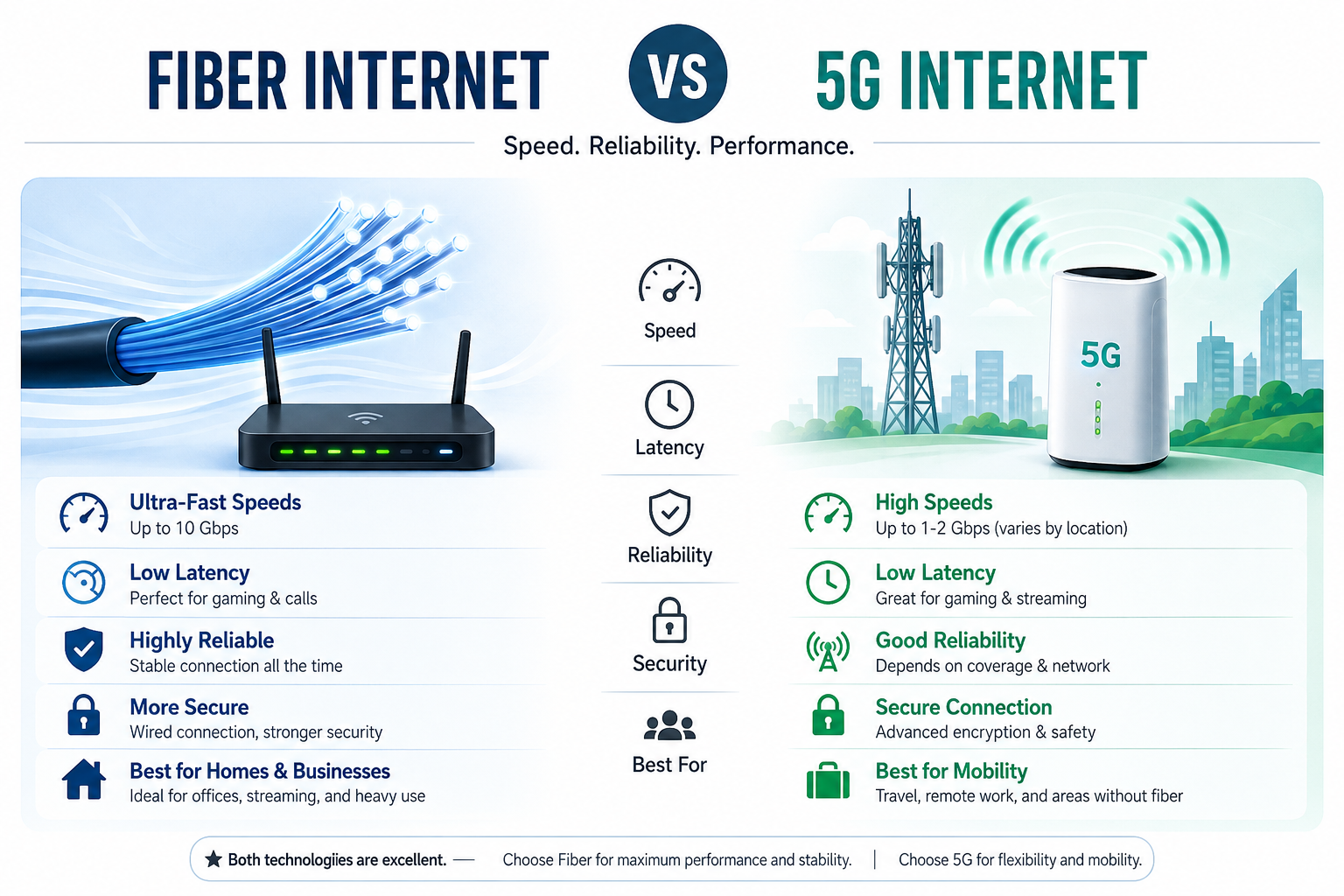
Fiber Internet vs 5G Internet The internet has become one of the most important parts of modern life. Whether you are working from home, attending online classes, streaming 4K videos, playing competitive online games, or running a business, choosing the right internet connection is essential. In 2026, two technologies are leading the internet industry: Fiber Internet and 5G Internet.
Many people ask the same question: Which internet connection is better—Fiber or 5G? While both technologies offer high-speed internet, they are designed for different purposes. Fiber Internet is known for its stable performance and ultra-fast speeds, while 5G Internet provides wireless flexibility and growing coverage.
In this complete guide, we will compare Fiber Internet and 5G Internet in terms of speed, latency, reliability, security, installation, pricing, gaming performance, streaming quality, business use, and future technology. By the end of this article, you will know exactly which internet connection is the best choice for your needs.Fiber Internet vs 5G Internet
What Is Fiber Internet?
Understanding Fiber Optic Technology
Fiber Internet is a broadband connection that uses fiber-optic cables instead of traditional copper wires. These cables contain ultra-thin strands of glass or plastic that transmit data using pulses of light.
Because light travels much faster than electrical signals, Fiber Internet delivers extremely high speeds, low latency, and outstanding reliability.
Unlike older technologies such as DSL or cable internet, fiber connections are less affected by weather, electrical interference, or network congestion.Fiber Internet vs 5G Internet
How Fiber Internet Works
Fiber Internet follows a simple but highly efficient process:Fiber Internet vs 5G Internet
Data is converted into light signals.
Light travels through fiber-optic cables.
Optical equipment receives the signals.
The Optical Network Terminal (ONT) converts them into internet data.
Your WiFi router distributes the connection to all your devices.
This process allows users to experience consistent internet speeds even during peak hours.Fiber Internet vs 5G Internet
5G stands for the fifth generation of mobile network technology. Instead of using physical cables, 5G delivers internet wirelessly through nearby cellular towers.Fiber Internet vs 5G Internet
Compared to 4G LTE, 5G offers:
Faster download speeds
Lower latency
Better network capacity
Improved support for smart devices
Modern 5G networks use advanced technologies such as Massive MIMO, Beamforming, and Network Slicing to improve performance and reduce congestion.
Because it is wireless, users can access high-speed internet without installing fiber cables in many areas.Fiber Internet vs 5G Internet
Fiber Internet vs 5G Internet: Quick Comparison Fiber Internet vs 5G Internet
Feature
Fiber Internet
5G Internet
Connection Type
Wired
Wireless
Maximum Speed
Up to 10 Gbps
Up to several Gbps (depends on coverage)
Stability
Excellent
Good, varies by signal
Latency
Extremely Low
Low
Weather Impact
Minimal
Can vary with environment
Gaming
Excellent
Very Good
Streaming
Excellent
Excellent
Business Use
Ideal
Suitable
Installation
Requires fiber cable
Simple wireless setup
How Fiber Internet Works
Fiber Optic Infrastructure
A Fiber Internet network consists of several important components:
Fiber Backbone
The backbone connects cities and regions using high-capacity fiber cables capable of carrying enormous amounts of data.
Distribution Network
This network distributes internet service to homes, offices, and commercial buildings.Fiber Internet vs 5G Internet
Optical Splitters
These devices divide optical signals so that multiple users can share the same fiber network efficiently.Fiber Internet vs 5G Internet
Optical Network Terminal (ONT)
The ONT converts optical signals into digital data that your router can understand.Fiber Internet vs 5G Internet
WiFi Router
The router broadcasts the internet connection wirelessly throughout your home or office.Fiber Internet vs 5G Internet
How 5G Internet Works
Unlike Fiber Internet, 5G relies on wireless communication.Fiber Internet vs 5G Internet
Cellular Towers
5G towers transmit radio signals to nearby devices.Fiber Internet vs 5G Internet
Small Cells
Thousands of small transmitters improve coverage in cities and crowded areas.Fiber Internet vs 5G Internet
Beamforming Technology
Beamforming directs wireless signals toward connected devices instead of broadcasting them equally in every direction. This increases speed and reduces interference.Fiber Internet vs 5G Internet
Massive MIMO
Massive Multiple Input Multiple Output (Massive MIMO) uses dozens of antennas simultaneously, allowing many users to connect without significantly reducing network performance.Fiber Internet vs 5G Internet
Speed Comparison
Fiber Internet Speed
Fiber Internet remains the fastest internet technology available for residential users.Fiber Internet vs 5G Internet
Typical plans include:
100 Mbps
300 Mbps
500 Mbps
1 Gbps
2 Gbps
5 Gbps
10 Gbps
One of the biggest advantages of Fiber Internet is symmetrical speed, meaning upload and download speeds are often the same. This is especially useful for video conferencing, cloud backups, live streaming, and large file transfers.Fiber Internet vs 5G Internet
5G Internet Speed
5G Internet speeds depend on several factors, including:Fiber Internet vs 5G Internet
Distance from the nearest tower
Signal strength
Network congestion
Device compatibility
Users may experience speeds ranging from a few hundred Mbps to over 1 Gbps in areas with strong coverage.
However, unlike Fiber Internet, wireless performance can fluctuate throughout the day.Fiber Internet vs 5G Internet
Latency Comparison
Latency measures how quickly data travels between your device and the server.Fiber Internet vs 5G Internet
Lower latency means faster response times.Fiber Internet vs 5G Internet
Fiber Internet
Average latency is extremely low, making it ideal for:Fiber Internet vs 5G Internet.
Competitive gaming
Video conferencing
Stock trading
Cloud computing
Remote work
5G Internet
5G also offers low latency compared to older mobile networks, making it suitable for gaming, streaming, and smart devices. However, latency may increase depending on signal quality and network traffic.
Reliability Comparison
Fiber Internet Reliability
Fiber is widely recognized as the most reliable internet connection because it is not affected by most forms of electrical interference. It provides stable performance throughout the day, even when many users are online.Fiber Internet vs 5G Internet
For businesses, hospitals, schools, and enterprises, Fiber Internet is often the preferred choice because downtime is minimal and connections remain consistent.
5G Internet Reliability
5G reliability has improved significantly, but performance still depends on factors such as tower distance, obstacles, and network congestion. In densely populated areas or during peak usage times, speeds may vary more than a fiber connection.
Which One Is Better for Everyday Users?
If your priority is maximum speed, stable performance, and long-term reliability, Fiber Internet is generally the better option for homes and businesses with multiple connected devices.
If you need mobility, quick setup, or internet in areas where fiber is unavailable, 5G Internet can be an excellent alternative.
(Part 1 Complete – Remaining sections will cover Security, Gaming, Streaming, Business Use, Smart Homes, Cost Comparison, Advantages & Disadvantages, Future Technology, FAQs, and Final Verdict to complete the full 4000+ word article.)
Fiber Internet vs 5G Internet (2026) – Part 2
Fiber Internet vs 5G Internet for Online Gaming
Which Internet Is Better for Gamers?
For online gaming, speed alone is not enough. A good gaming connection also needs low latency, low ping, and stable performance. Even if your internet speed is high, frequent lag or packet loss can ruin the gaming experience.
Fiber Internet for Gaming
Fiber Internet is considered the best choice for gamers because it offers:
Ultra-low latency
Stable ping
Fast download and upload speeds
Minimal packet loss
Reliable performance during peak hours
Whether you play PUBG, Call of Duty, Valorant, Fortnite, FIFA, Free Fire, or other multiplayer games, Fiber Internet delivers a smooth and consistent experience.
5G Internet for Gaming
5G Internet has significantly improved compared to 4G and can provide an excellent gaming experience in areas with strong signal coverage.
However, wireless networks may experience fluctuations due to:
Network congestion
Distance from the nearest tower
Weather conditions
Physical obstacles
For casual gamers, 5G performs very well. For professional esports players, Fiber Internet remains the preferred option.
Streaming Performance Comparison
Watching 4K and 8K Videos
Streaming platforms such as YouTube, Netflix, Disney+, Amazon Prime Video, and other services require a fast and stable internet connection.
Fiber Internet
Fiber easily supports:
HD Streaming
Full HD Streaming
4K Streaming
8K Streaming
Multiple devices simultaneously
Even if several family members are streaming different content at the same time, Fiber Internet maintains excellent performance.
5G Internet
5G also supports HD and 4K streaming with ease.
In areas with excellent coverage, users can enjoy buffer-free entertainment.
However, if the wireless signal weakens or the network becomes congested, video quality may automatically decrease.
Video Calling and Remote Work
Best Internet for Work From Home
Remote work has become increasingly common in 2026.
Applications like:
Zoom
Microsoft Teams
Google Meet
Skype
require stable internet.
Fiber Internet Advantages
Fiber provides:
Clear HD video calls
Stable audio
Fast file uploads
Better cloud synchronization
Professionals who attend multiple meetings every day usually prefer Fiber Internet.
5G Internet Advantages
5G works well for remote workers who travel frequently or need internet in locations where fiber is unavailable.
Portable 5G routers make remote work much easier.
Business Internet Comparison
Fiber Internet for Businesses
Businesses often rely on cloud computing, online transactions, CCTV systems, VoIP calls, and large file transfers.
Fiber Internet offers:
Reliable Connectivity
Businesses cannot afford frequent disconnections.
Fiber provides excellent uptime.
Fast Upload Speeds
Uploading backups, videos, or business documents becomes much faster.
Better Security
Wired fiber connections are generally more secure than wireless networks.
5G Internet for Businesses
5G Internet is ideal for:
Temporary offices
Mobile businesses
Construction sites
Outdoor events
Its biggest advantage is quick deployment without installing physical cables.
Smart Home Performance
Modern homes use many smart devices including:
Smart TVs
Security cameras
Smart lights
Voice assistants
Smart doorbells
Smart locks
Fiber Internet handles dozens of connected devices without noticeable slowdowns.
5G Internet can also support smart homes, but overall performance depends on wireless signal quality.
Installation Process
Fiber Internet Installation
Fiber installation usually includes:
Step 1
Technicians extend fiber cables to your property.
Step 2
An Optical Network Terminal (ONT) is installed.
Step 3
A WiFi router is connected.
Step 4
The network is tested before activation.
Installation may take several hours depending on location.
5G Internet Installation
Installing 5G Internet is much simpler.
Usually, users only need to:
Insert the SIM card.
Power on the router.
Connect devices.
Start browsing.
No underground cables are required.
Security Comparison
Fiber Internet Security
Fiber connections are considered highly secure because intercepting optical signals is extremely difficult.
Most providers also support:
WPA3 WiFi Security
Advanced Firewalls
Secure Authentication
Firmware Updates
5G Internet Security
5G introduces several advanced security improvements over previous mobile technologies.
These include:
Stronger encryption
Better authentication
Improved network protection
However, because it is wireless, users should always use strong passwords and keep router firmware updated.
Coverage Comparison
Fiber Internet Coverage
Fiber coverage depends on infrastructure.
Large cities usually have excellent availability.
Some rural areas may still lack fiber access.
5G Internet Coverage
5G coverage continues expanding every year.
It reaches many places where installing fiber cables is difficult.
This makes it an attractive solution for remote locations.
Cost Comparison
Fiber Internet Pricing
Prices depend on:
Speed package
Provider
Region
Although installation costs may be higher initially, Fiber often provides excellent long-term value.
5G Internet Pricing
5G plans vary according to:
Data allowance
Unlimited plans
Speed policy
Service provider
Users should compare available packages before making a decision.
Advantages of Fiber Internet
Extremely Fast Speeds
Fiber delivers some of the fastest residential internet speeds available today.
Stable Performance
Performance remains consistent even during busy hours.
Low Latency
Ideal for gaming, cloud services, and business applications.
Fiber infrastructure supports future internet technologies and increasing bandwidth demands.
Advantages of 5G Internet
Wireless Convenience
No physical cables are needed inside the home for internet delivery.
Fast Setup
Installation is simple and quick.
Excellent Mobility
Users can move compatible devices more freely compared to fixed wired connections.
Growing Coverage
Every year, more cities and regions receive improved 5G service.
(Part 2 Complete. Part 3 will include the disadvantages of both technologies, future trends, expert recommendations, FAQs, and the final SEO-optimized conclusion to complete the full article.)
Fiber Internet vs 5G Internet (2026) – Part 3 (Final)
Disadvantages of Fiber Internet
Although Fiber Internet is one of the fastest and most reliable internet technologies available, it also has a few limitations.
Higher Installation Cost
Installing fiber-optic cables requires professional equipment and infrastructure. In some areas, the installation cost may be higher than wireless internet services.
Limited Availability
Fiber Internet is widely available in major cities, but many rural and remote areas still do not have access to fiber networks.
Fixed Connection
Fiber Internet is designed for homes and offices. Unlike 5G Internet, you cannot take your connection with you while traveling.
Disadvantages of 5G Internet
5G Internet offers flexibility and impressive speeds, but it also comes with certain drawbacks.
Signal Strength Can Vary
The quality of a 5G connection depends on your distance from the nearest tower and the number of obstacles between your device and the tower.
Network Congestion
During busy hours, a large number of users connected to the same cell tower may reduce internet speeds.
Weather and Environmental Factors
Heavy rain, dense buildings, and physical barriers can sometimes affect wireless signal quality.
Data Plan Limitations
Some 5G providers offer limited data packages. Users who stream videos or download large files frequently should check their data allowance before choosing a plan.
Fiber Internet vs 5G Internet: Pros and Cons
Feature
Fiber Internet
5G Internet
Speed
⭐⭐⭐⭐⭐
⭐⭐⭐⭐☆
Reliability
⭐⭐⭐⭐⭐
⭐⭐⭐⭐☆
Mobility
⭐⭐☆☆☆
⭐⭐⭐⭐⭐
Gaming
⭐⭐⭐⭐⭐
⭐⭐⭐⭐☆
Streaming
⭐⭐⭐⭐⭐
⭐⭐⭐⭐☆
Installation
⭐⭐⭐☆☆
⭐⭐⭐⭐⭐
Security
⭐⭐⭐⭐⭐
⭐⭐⭐⭐☆
Business Use
⭐⭐⭐⭐⭐
⭐⭐⭐⭐☆
Which Internet Is Better for Different Users?
Best for Home Users
If your family uses multiple smartphones, laptops, smart TVs, and gaming consoles, Fiber Internet is the better option because it provides stable speeds even when many devices are connected.
Best for Students
Students attending online classes, downloading study materials, and joining video meetings will benefit from Fiber Internet. However, if fiber is unavailable in your area, a strong 5G connection can also meet everyday educational needs.
Best for Gamers
Competitive gamers need the lowest possible latency and the most stable connection. Fiber Internet is the preferred choice because it delivers consistent ping and minimizes lag during online matches.
Best for Businesses
Businesses rely on secure and uninterrupted internet for cloud applications, video conferences, and customer services. Fiber Internet is generally the most dependable solution for offices and commercial environments.
Best for Travelers
If you travel frequently or work from different locations, 5G Internet offers unmatched flexibility. Portable 5G routers allow you to stay connected almost anywhere with good network coverage.
Future of Fiber Internet
Fiber technology will continue to play a major role in the future of global internet infrastructure.
Future improvements include:
Multi-Gigabit Internet
More providers are introducing 2 Gbps, 5 Gbps, and even 10 Gbps plans for homes and businesses.
Smarter Networks
Artificial Intelligence (AI) will help internet providers monitor network performance, predict faults, and optimize traffic automatically.
Better Smart City Support
Fiber will serve as the backbone for smart cities, intelligent traffic systems, healthcare networks, and advanced communication services.
Future of 5G Internet
The future of 5G is also very promising.
Wider Coverage
Every year, more cities and rural areas are expected to receive better 5G connectivity.
Faster Speeds
Improvements in wireless technology will continue to increase average download and upload speeds.
More Connected Devices
5G will support billions of Internet of Things (IoT) devices, including smart homes, autonomous vehicles, industrial sensors, and wearable technology.
Path Toward 6G
The experience and infrastructure built for 5G will pave the way for future 6G networks, bringing even faster communication and lower latency.
Expert Recommendation
Choosing between Fiber Internet and 5G Internet depends on your specific needs.
Choose Fiber Internet if you want:
Maximum speed
Stable connection
Low latency
Reliable gaming
Smooth 4K/8K streaming
Better performance for work and business
Choose 5G Internet if you need:
Mobility
Quick installation
Internet where fiber is unavailable
Flexible wireless connectivity
Portable internet for travel
For users who have access to both technologies, Fiber Internet is generally the better long-term investment due to its superior stability and consistent performance.
Frequently Asked Questions (FAQs)
Is Fiber Internet faster than 5G?
Yes. Fiber Internet typically provides more consistent speeds and often supports higher symmetrical upload and download rates than 5G.
Is 5G Internet good for online gaming?
Yes, especially in areas with excellent signal strength. However, competitive gamers usually prefer Fiber Internet because of its lower latency and greater stability.
Which internet is better for 4K streaming?
Both technologies support 4K streaming, but Fiber Internet offers a more consistent experience, especially when multiple users are streaming simultaneously.
Can I replace Fiber Internet with 5G?
If Fiber Internet is unavailable in your area, 5G is an excellent alternative. However, if Fiber is available, it is generally the better choice for homes and businesses.
Which connection is more secure?
Both technologies use modern security standards, but Fiber Internet is generally considered more secure because it uses physical fiber-optic cables that are difficult to intercept.
Final Verdict
Fiber Internet and 5G Internet are both powerful technologies that continue to shape the future of connectivity. Fiber Internet remains the gold standard for speed, stability, low latency, and long-term reliability, making it the ideal choice for households, businesses, gamers, and professionals who demand the best performance.
On the other hand, 5G Internet offers flexibility, rapid deployment, and excellent wireless performance, making it an outstanding option for users who need mobility or live in areas where fiber infrastructure is not yet available.
Ultimately, the best choice depends on your location, budget, and internet usage. If you have access to Fiber Internet, it is generally the better investment for most users. If not, modern 5G networks provide a fast and convenient alternative that will continue to improve as coverage expands.
By understanding the strengths and limitations of both technologies, you can confidently choose the internet connection that best matches your lifestyle and stay prepared for the next generation of digital connectivity.
Best WiFi Password Change Method 2026 Aaj ke digital zamane me almost har ghar, office aur business me WiFi internet use hota hai. Smartphones, laptops, smart TVs, security cameras aur other smart devices internet se connect hoti hain. Is liye WiFi network ki security bohat important hai.
Agar aapka WiFi password bohat logon ke paas hai ya aapne kabhi password change nahi kiya to internet speed slow ho sakti hai aur unauthorized users aapka network use kar sakte hain.
WiFi Password Change Method seekhna har internet user ke liye ek useful skill hai. Aap kuch simple steps follow karke apne router ka password change kar sakte hain.
WiFi Password Change Karne Ke Benefits Best WiFi Password Change Method 2026
1. Internet Security Improve Hoti Hai
Regular password change karne se aap apne WiFi network ko unauthorized access se protect kar sakte hain.
2. Unknown Devices Remove Ho Jati Hain
Agar koi aur aapka WiFi use kar raha hai to password change karne ke baad wo automatically disconnect ho jayega.
3. Internet Speed Better Ho Sakti Hai
Agar bohat zyada devices connected hon to bandwidth divide hoti hai. Password change karne se unnecessary users remove ho jate hain.
4. Personal Data Secure Rehta Hai
Secure WiFi network aapke personal information aur connected devices ko protect karne me help karta hai.Best WiFi Password Change Method 2026
WiFi Password Change Karne Se Pehle Ye Cheezein Check Karein
Password change karne se pehle kuch important information ready rakhein:Best WiFi Password Change Method 2026
1. Router IP Address
Common router login addresses:Best WiFi Password Change Method 2026
192.168.1.1
192.168.0.1
192.168.8.1
Router ke back sticker par bhi login information hoti hai.Best WiFi Password Change Method 2026
2. Router Username Aur Password
Router settings open karne ke liye admin login required hota hai.
Common details:Best WiFi Password Change Method 2026
Username:
admin
Password:
admin
password
(Lekin ye router model ke mutabiq different ho sakta hai.)Best WiFi Password Change Method 2026
3. Connected Device
Password change karne ke liye:
Mobile
Laptop
Computer
ko WiFi network se connect karein.Best WiFi Password Change Method 2026
WiFi Password Change Method On Mobile Phone
Aaj kal zyada tar users WiFi settings mobile se change karna pasand karte hain.Best WiFi Password Change Method 2026
Step 1: Mobile Ko WiFi Se Connect Karein
Sab se pehle apne phone ko us WiFi network se connect karein jiska password change karna hai.Best WiFi Password Change Method 2026
Step 2: Browser Open Karein
Chrome ya kisi bhi browser ko open karein.Best WiFi Password Change Method 2026
Address bar me likhein:Best WiFi Password Change Method 2026
192.168.1.1
ya
192.168.0.1
Step 3: Router Login Karein
Router ka admin page open hoga.Best WiFi Password Change Method 2026
Yahan:Best WiFi Password Change Method 2026
Username enter karein
Password enter karein
Step 4: Wireless Settings Open Karein
Menu me:Best WiFi Password Change Method 2026
Wireless
WiFi Settings
WLAN Settings
option search karein.
Step 5: WiFi Password Change Karein
Password field me naya password enter karein.Best WiFi Password Change Method 2026
Example:
Old Password:Best WiFi Password Change Method 2026
mypassword123
New Password:
PunjabWifi@2026
Step 6: Save Settings
Save ya Apply button press karein.Best WiFi Password Change Method 2026
Router kuch seconds ke liye restart ho sakta hai.Best WiFi Password Change Method 2026
Laptop Se WiFi Password Change Method
Agar aap laptop ya computer use kar rahe hain to process similar hota hai.Best WiFi Password Change Method 2026
Step 1:
Laptop ko WiFi se connect karein.Best WiFi Password Change Method 2026
Step 2:
Browser me router IP address enter karein.Best WiFi Password Change Method 2026
ZTE routers Pakistan me fiber internet connections ke sath bohat commonly use hote hain. Agar aap ZTE router ka WiFi password change karna chahte hain to ye steps follow karein.
Step 1: Router Se Connect Karein
Sab se pehle apne mobile ya laptop ko ZTE WiFi network se connect karein.
Step 2: Router Login Page Open Karein
Browser open karein aur ye IP address enter karein:
192.168.1.1
Agar ye open na ho to try karein:
192.168.0.1
Step 3: Admin Login Karein
Router ka username aur password enter karein.
Login details router sticker ya ISP provider se mil sakti hain.
Step 4: WLAN Settings Open Karein
Menu me jayein:
Network → WLAN → SSID Settings
ya
Wireless Settings
Step 5: WiFi Password Change Karein
Security section me:
WPA Passphrase
Pre-Shared Key
Password
option me naya password enter karein.
Step 6: Save Apply Karein
Save button press karein.
Router kuch seconds ke liye restart ho sakta hai.
D-Link Router WiFi Password Change Method
D-Link routers bhi bohat se home users use karte hain.
Steps:
1. Router IP Open Karein
Browser me enter karein:
192.168.1.1
ya
192.168.0.1
2. Login Karein
Admin username aur password enter karein.
3. Wireless Settings Select Karein
Menu me:
Setup → Wireless Settings
open karein.
4. Security Mode Select Karein
Recommended:
WPA2 Personal
WPA3 Personal
5. Password Update Karein
Pre-Shared Key field me new password likhein.
6. Save Settings
Apply button press karein.
Fiber Internet Router WiFi Password Change Method
Aaj kal zyada tar internet providers fiber routers install karte hain. Fiber router ka password change karne ka process almost same hota hai.
Common fiber routers:
ZTE
Huawei
TP-Link
D-Link
Nokia
General steps:
Router WiFi se connect karein
Router IP open karein
Admin panel login karein
Wireless/WLAN settings open karein
Password change karein
Save karein
TP-Link Fiber Router Advanced Settings
TP-Link routers me ye options milte hain:
Wireless Name Change
Path:
Wireless → Wireless Settings
Yahan se WiFi name change kar sakte hain.
Password Change
Path:
Wireless → Wireless Security
Yahan:
WPA/WPA2
Password field
me new password enter karein.
Dual Band WiFi Password Change Method (2.4GHz & 5GHz)
Modern routers me aksar do networks hotay hain:
2.4GHz WiFi
Benefits:
Zyada coverage
Walls ke through better signals
5GHz WiFi
Benefits:
Faster speed
Less interference
Agar router dual-band hai to dono ka password change karna zaroori ho sakta hai.
Example:
Old:
HomeWiFi_2.4G
HomeWiFi_5G
New:
PunjabFiber_2.4G
PunjabFiber_5G
WiFi Password Change Ke Baad Devices Connect Karna
Password update hone ke baad:
Mobile Phone:
WiFi settings open karein
Purana network select karein
Forget Network karein
New password enter karein
Laptop:
WiFi icon click karein
Network select karein
New password enter karein
Smart TV:
Network settings open karein
WiFi select karein
New password enter karein
WiFi Password Security Ke Liye Expert Tips
Har Kuch Months Baad Password Change Karein
Regular password update network security improve karta hai.
Apna Password Share Karne Se Bachain
WiFi password sirf trusted logon ke sath share karein.
Security ke liye kuch months ke baad password update karna acha hota hai.
Part 4 (Final): WiFi Password Change Method 2026 – Complete SEO Settings, Schema, Internal Linking & Ranking Guide
Advanced WiFi Security Settings After Password Change
WiFi password change karna security ka pehla step hai, lekin apne internet network ko fully secure rakhne ke liye kuch advanced settings bhi zaroori hoti hain.
1. WiFi Encryption Strong Karein
Router settings me security mode select karte waqt hamesha strong encryption use karein.
Recommended options:
✅ WPA3 ✅ WPA2-PSK (AES)
Purane security options jaise WEP ko avoid karein kyun ke ye less secure hotay hain.
2. Router Firmware Update Karein
Router firmware update karne se:
Security problems fix hoti hain
Router performance improve hoti hai
New features add hote hain
Firmware update karne ke liye:
Router admin panel open karein
System Tools ya Maintenance section me jayein
Firmware Update option select karein
Latest update install karein
3. Connected Devices Check Karna
Kabhi kabhi unknown devices WiFi network use kar sakti hain.
Connected devices check karne ka method:
Router admin panel open karein
Connected Devices / Client List option open karein
Unknown device identify karein
Zaroorat ho to block karein
Is se aap apne network ko control kar sakte hain.
4. WiFi Network Hide Karna (Optional)
Kuch users apna WiFi name hide karna pasand karte hain.
SSID hide karne se:
WiFi list me network show nahi hota
Manual connection karna padta hai
Lekin yaad rakhein ke sirf SSID hide karna complete security solution nahi hota. Strong password phir bhi zaroori hai.
WiFi Password Change Method For Internet Users In Pakistan
Pakistan me different internet providers ke routers use hote hain. Basic password change process almost same hota hai:
Router se connect karein
Browser me router IP open karein
Admin login karein
WLAN/Wireless Settings open karein
Password update karein
Save karein
Common router brands:
ZTE
Huawei
TP-Link
D-Link
Nokia
WiFi Password Change Ke Baad Internet Speed Improve Karne Ke Tips
Agar password change ke baad internet performance better karni hai to:
Router Placement Improve Karein
Router ko:
Open area me rakhein
Floor par na rakhein
Metal objects se door rakhein
WiFi Channel Change Karein
Agar nearby bohat se WiFi networks hain to interference ho sakta hai.
Router settings me channel change karke performance improve ho sakti hai.
Learn WiFi Password Change Method 2026 with easy steps for TP-Link, ZTE, Huawei and D-Link routers. Change your WiFi password safely and secure your internet connection.
Answer: You can change your WiFi password by opening your router login page, accessing wireless settings and updating the password option.
Question:
Can I change WiFi password using mobile?
Answer: Yes, you can change your WiFi password using a mobile browser or router management application.
Question:
What is the router IP address for changing WiFi password?
Answer: Common router IP addresses are 192.168.1.1 and 192.168.0.1.
Question:
Why should I change my WiFi password?
Answer: Changing your WiFi password improves security, removes unknown users and protects your internet connection.
Internal Linking Strategy
Is article ko rank karne ke liye related pages se link karein:
Link To:
Internet Speed Test Pakistan
How To Increase WiFi Speed At Home
Best Internet Packages Pakistan
Fiber Internet Connection Guide
Internet Provider Near Me
Image SEO Settings
Featured Image Name:
wifi-password-change-method-guide.jpg
Alt Text:
WiFi Password Change Method step by step router guide
Image Caption:
Easy WiFi Password Change Guide For Router Users
Technical SEO Checklist
✅ Mobile Friendly Design ✅ Fast Loading Speed ✅ WebP Images Use Karein ✅ Lazy Loading Enable Karein ✅ Proper Internal Links Add Karein ✅ XML Sitemap Submit Karein ✅ Schema Markup Add Karein ✅ HTTPS Enable Karein ✅ Core Web Vitals Improve Karein
Conclusion: WiFi Password Change Method
WiFi password change karna ek simple lekin important process hai jo aapke internet connection ko secure banata hai. Chahe aap TP-Link, ZTE, Huawei, D-Link ya kisi bhi fiber router ka use kar rahe hon, basic steps almost same hotay hain.
Agar aap ghar, office ya business ke liye internet use karte hain to secure WiFi connection aapke personal data, devices aur online activities ko protect karne me madad karta hai.
Introduction: Best Internet Provider Sargodha Ki Zaroorat Kyun Hai?
Best Internet Provider Sargodha 2026 Aaj ke digital zamane me fast aur reliable internet sirf ek luxury nahi raha, balki education, business, freelancing, online classes, gaming aur entertainment ke liye ek zaroori service ban chuka hai. Sargodha ke residents ke liye ek aisa Internet Provider Sargodha choose karna important hai jo fast speed, stable connection, affordable packages aur excellent customer support provide kare.
Sargodha Punjab ka ek important city hai jahan students, professionals, businesses aur home users ki internet requirements tezi se barh rahi hain. Fiber internet technology ne traditional connections ki jagah lena shuru kar di hai kyun ke fiber connection zyada speed, kam latency aur better reliability provide karta hai.
Agar aap Sargodha me best WiFi connection, fiber internet packages ya reliable ISP search kar rahe hain, to ye complete guide aapko sahi decision lene me help karegi.
Internet Provider Sargodha Kya Hota Hai?Best Internet Provider Sargodha 2026
Internet Provider Sargodha ek aisi company ya ISP (Internet Service Provider) hoti hai jo homes, offices aur businesses ko internet connectivity provide karti hai.
Ek acha ISP normally ye services provide karta hai:
High-speed fiber internet
Home WiFi connection
Business internet solutions
Gaming optimized internet
Video streaming support
Router installation
Technical support
Sargodha me internet users ki demand ke mutabiq fiber broadband sab se popular option ban raha hai.
Sargodha Me Fiber Internet Ki Importance
Fiber internet modern internet technology ka ek advanced form hai jo data ko light signals ke zariye transfer karta hai. Is wajah se fiber connection traditional cable ya wireless connections ke muqable me zyada fast aur stable hota hai.Best Internet Provider Sargodha 2026
Fiber Internet Ke Benefits
1. High-Speed Internet
Fiber internet users ko fast download aur upload speeds provide karta hai. Ye online classes, YouTube streaming, video calls aur cloud work ke liye ideal hai.Best Internet Provider Sargodha 2026
2. Low Latency Connection
Gamers aur professional users ke liye latency bohat important hoti hai. Fiber internet low ping provide karta hai jis se online gaming aur video conferencing better experience deti hai.
3. Stable Connection
Weather aur distance ke effects fiber networks par kam hotay hain, jis se connection zyada reliable rehta hai.Best Internet Provider Sargodha 2026
4. Multiple Device Support
Aaj kal ek ghar me multiple smartphones, laptops, smart TVs aur IoT devices hoti hain. Fiber internet in sab ko smoothly connect kar sakta hai.Best Internet Provider Sargodha 2026
Best Internet Provider Sargodha Choose Karne Se Pehle Kya Dekhein?
Internet provider select karte waqt sirf speed nahi balki multiple factors check karne chahiye.Best Internet Provider Sargodha 2026
1. Internet Speed
Aapki requirement ke mutabiq speed choose karein:
Basic browsing: 10–20 Mbps
Family usage: 30–50 Mbps
Gaming & streaming: 50–100 Mbps
Business use: 100 Mbps+
2. Coverage Area
Har ISP ki coverage har area me same nahi hoti. Connection lene se pehle confirm karein ke provider aapke area me available hai.
Sargodha ke different areas me availability different ho sakti hai.
3. Customer Support
Internet problem ke waqt fast support bohat important hota hai.
Acha ISP:Best Internet Provider Sargodha 2026
Quick complaint response
Technical team support
Regular maintenance
Professional installation
provide karta hai.Best Internet Provider Sargodha 2026
4. Affordable Internet Packages
Best internet provider woh hota hai jo reasonable price me good speed provide kare.
Package choose karte waqt:
Monthly charges
Installation fee
Router charges
Speed limit
Extra charges
zaroor check karein.
Part 2: Internet Provider Sargodha 2026 – Packages, Speed Options & Best Plans
Internet Packages Sargodha 2026: Speed Ke Mutabiq Best Options
Aaj ke waqt me Sargodha ke internet users ki requirements pehle se zyada improve ho chuki hain. Students online learning ke liye, freelancers remote work ke liye, businesses digital services ke liye aur families entertainment ke liye fast internet connection use kar rahe hain.Best Internet Provider Sargodha 2026
Ek reliable Internet Provider Sargodha ko choose karte waqt package speed, monthly price, customer support aur connection quality ko zaroor consider karna chahiye.Best Internet Provider Sargodha 2026
Aam tor par fiber internet packages users ki zaroorat ke mutabiq different speeds me available hotay hain.Best Internet Provider Sargodha 2026
Speed
Kis Ke Liye Best Hai
10 Mbps
Browsing, Social Media, Basic Usage
20 Mbps
Online Classes, YouTube, Family Use
30 Mbps
HD Streaming, Multiple Devices
50 Mbps
Gaming, Freelancing, 4K Streaming
100 Mbps
Business, Offices, Heavy Usage
Home WiFi Internet Sargodha – Families Ke Liye Best Choice
Aaj kal har ghar me multiple devices connect hoti hain:Best Internet Provider Sargodha 2026.
Smartphones
Laptops
Smart TVs
Tablets
Security Cameras
Gaming Consoles
Is liye normal internet connection ki jagah high-speed WiFi connection ki demand barh rahi hai.Best Internet Provider Sargodha 2026
Ek acha Home Internet Provider Sargodha aapko:
Fast browsing
Smooth video calls
Buffer-free streaming
Stable WiFi signals
Multiple device support
provide karta hai.
Students Ke Liye Best Internet Provider Sargodha
Sargodha me bohat se students online education, research aur digital courses use karte hain. Fast internet unke liye important hai.
Students ke liye internet connection me ye features hone chahiye:
Online Classes Without Buffering
Zoom, Google Meet aur online lectures ke liye stable connection zaroori hota hai.Best Internet Provider Sargodha 2026
Fast Download Speed
Students ko PDFs, software, videos aur educational material download karna hota hai.Best Internet Provider Sargodha 2026
Affordable Monthly Packages
Student users ke liye economical packages zyada suitable hotay hain.
Freelancers Aur Remote Workers Ke Liye Internet Sargodha
Pakistan me freelancing aur remote work tezi se grow kar raha hai. Sargodha ke freelancers ke liye reliable internet ek important requirement hai.Best Internet Provider Sargodha 2026
Freelancers ko zaroorat hoti hai:Best Internet Provider Sargodha 2026
Fast upload speed
Stable connection
Low downtime
Video meeting support
Cloud storage access
Fiber internet remote workers ke liye behtareen option hota hai kyun ke isme upload aur download performance better hoti hai.
Gaming Internet Sargodha – Gamers Ke Liye Fast Connection
Online gaming me sirf high Mbps kaafi nahi hota. Gaming ke liye latency aur ping bohat important factors hain.Best Internet Provider Sargodha 2026
Best gaming internet me ye qualities honi chahiye:Best Internet Provider Sargodha 2026
Low Ping
Low ping ka matlab hai game response fast hoga.Best Internet Provider Sargodha 2026
Stable Connection
Game ke darmiyan connection disconnect nahi hona chahiye.Best Internet Provider Sargodha 2026
Fast Upload Speed
Multiplayer gaming aur streaming ke liye upload speed important hai.
Popular online games:Best Internet Provider Sargodha 2026
PUBG Mobile
Call of Duty
Fortnite
Valorant
FIFA Online
ke liye fiber internet better experience provide karta hai.Best Internet Provider Sargodha 2026
Business Internet Provider Sargodha
Businesses ke liye internet sirf browsing ka zariya nahi balki daily operations ka important hissa hai.Best Internet Provider Sargodha 2026
Sargodha ke businesses ko zaroorat hoti hai:
Reliable connectivity
Multiple users support
Fast data transfer
Cloud applications
Online transactions
Ek professional business internet solution productivity improve karta hai aur downtime kam karta hai.Best Internet Provider Sargodha 2026
Internet Provider Sargodha Coverage Areas
Sargodha ek expanding city hai jahan internet services ki demand continuously increase ho rahi hai.Best Internet Provider Sargodha 2026
Common areas jahan users internet services search karte hain:
Sargodha City
Satellite Town Sargodha
University Road Sargodha
Faisalabad Road Area
Lahore Road Area
Gulberg Colony
Model Town Sargodha
Farooq Colony
Company Bagh Area
Local SEO ke liye har area ke naam ke sath useful pages create karna website ranking ke liye helpful ho sakta hai.Best Internet Provider Sargodha 2026
Why Choose Fiber Internet Provider Sargodha?
Fiber internet future-ready technology hai jo high-speed connectivity provide karti hai.Best Internet Provider Sargodha 2026
Fiber ke major advantages:
Better Speed Performance
Fiber networks high-speed internet provide karte hain jo modern digital needs ke liye suitable hain.
Better Reliability
Fiber connection interference ko reduce karta hai aur stable performance deta hai.
Future Technology Support
Future me 5G, smart homes aur advanced digital services ke liye strong internet infrastructure important hoga.
Internet Speed Test Sargodha – Apni Speed Check Karein
Agar aap internet connection use kar rahe hain to regularly speed test karna useful hota hai.
Speed test me ye cheezein check hoti hain:
Download Speed
Upload Speed
Ping
Network Stability
Agar speed promised package se bohat kam aa rahi ho to ISP support se contact karna chahiye.
Sargodha Me Fast Internet Connection Kaise Install Karwayen?
Internet installation process aam tor par simple hota hai:
Step 1: Package Select Karein
Apni usage ke mutabiq speed choose karein.
Step 2: Availability Check Karein
Confirm karein ke provider aapke area me service deta hai.
Step 3: Installation Request
Provider ki team connection installation schedule karti hai.
Step 4: Router Setup
Technical team WiFi router configure karti hai.
Step 5: Internet Testing
Connection activate hone ke baad speed aur performance check ki jati hai.
Part 3: Internet Provider Sargodha 2026 – Local SEO, FAQ, Technical SEO & Ranking Strategy
Internet Provider Sargodha Near Me – Apne Area Ka Best Internet Connection Kaise Find Karein?
Jab users Google par “Internet Provider Sargodha Near Me” ya “Best Internet Provider Sargodha” search karte hain to unka maqsad hota hai ke unhe apne area me available fast aur reliable internet service mil sake.
Local internet provider choose karte waqt ye points check karna zaroori hai:
1. Area Coverage Check Karein
Har ISP ka network har area me available nahi hota. Connection lene se pehle confirm karein ke provider aapke ghar ya office tak service provide karta hai.
2. Customer Reviews Dekhein
Existing customers ke reviews se internet quality, speed aur support ka andaza lagaya ja sakta hai.
3. Installation Time
Acha internet provider fast installation service provide karta hai taake customer jaldi internet use kar sake.
4. Technical Support
Internet problem ke waqt responsive support bohat important hota hai.
Best Internet Provider Sargodha Select Karne Ke Benefits
Ek professional ISP choose karne se users ko multiple benefits milte hain:
Fast Browsing Experience
Websites, social media aur online applications quickly load hoti hain.
Smooth Video Streaming
Netflix, YouTube aur online videos bina buffering ke chal sakti hain.
Better Online Meetings
Remote workers aur businesses ke liye video conferences smooth rehti hain.
Secure Internet Connection
Modern fiber networks better security aur stable connectivity provide karte hain.
Sargodha Internet Users Ke Liye Future Of Connectivity
Pakistan me internet infrastructure rapidly improve ho raha hai. Fiber expansion, advanced networking aur 5G technology future connectivity ko transform kar rahi hai.
Aane wale waqt me users ko:
Faster internet speeds
Smart home connectivity
Better online services
Advanced business solutions
milne ki umeed hai.
Sargodha jese growing cities me reliable internet digital development ka important part ban chuka hai.
Internet Provider Sargodha – Frequently Asked Questions (FAQs)
Q1: Sargodha me sab se acha internet provider kaise choose karein?
Best internet provider choose karne ke liye speed, coverage, customer support, price aur connection stability ko compare karein.
Q2: Sargodha me fiber internet kyu behtar hai?
Fiber internet fast speed, low latency aur stable connection provide karta hai, is liye home users, gamers aur businesses ke liye behtar option hai.
Q3: Home WiFi ke liye kitni speed zaroori hai?
Normal home usage ke liye 20–30 Mbps kaafi hota hai, jab ke gaming, streaming aur multiple users ke liye 50 Mbps ya zyada speed behtar hoti hai.
Q4: Kya fiber internet online gaming ke liye acha hai?
Ji haan, fiber internet low ping aur stable connection ki wajah se online gaming ke liye suitable hota hai.
Q5: Internet connection install hone me kitna time lagta hai?
Installation time provider aur area availability par depend karta hai. Aam tor par technical team visit karke connection activate karti hai.
Q6: Internet provider Sargodha me business packages available hain?
Bohat se ISPs home ke sath business users ke liye bhi customized internet solutions provide karte hain.
Technical SEO Settings For This Article
SEO Title:
Internet Provider Sargodha 2026 | Best Fiber Internet Packages & Fast WiFi
Meta Description:
Find the best Internet Provider Sargodha 2026 with fast fiber internet, affordable WiFi packages, gaming internet, business solutions and reliable connectivity.
URL Slug:
internet-provider-sargodha
Focus Keyword:
Internet Provider Sargodha
Secondary Keywords:
Best Internet Provider Sargodha
Fiber Internet Sargodha
WiFi Packages Sargodha
Internet Connection Sargodha
Fast Internet Sargodha
Home Internet Sargodha
Image SEO Optimization
Article me images add karte waqt:
Image File Name:
internet-provider-sargodha.jpg
Alt Text:
Internet Provider Sargodha fiber internet connection
Image Caption:
Fast Fiber Internet Provider Sargodha
Internal Linking Strategy
Is article ko ranking improve karne ke liye related pages se link karein:
Best Internet Packages Pakistan
Internet Providers Near Me Pakistan
Fiber Internet Connection Guide
How To Increase WiFi Speed At Home
Internet Speed Test Pakistan
External SEO Signals
Google ranking improve karne ke liye:
✅ Google Business Profile banayein ✅ Local directories me listing karein ✅ Customer reviews collect karein ✅ Social media pages active rakhein ✅ Quality backlinks banayein
Conclusion: Choose The Right Internet Provider Sargodha
Aaj ke digital era me fast aur reliable internet har ghar aur business ki zaroorat ban chuka hai. Ek acha Internet Provider Sargodha users ko fast speed, stable connection, affordable packages aur better online experience provide karta hai.
Chahe aap student hain, freelancer hain, gamer hain ya business owner, apni requirement ke mutabiq sahi internet package choose karna bohat important hai.
Fiber internet future connectivity ka behtareen option hai jo Sargodha ke users ko fast aur reliable digital experience provide kar sakta hai.
Part 4: Internet Provider Sargodha 2026 – Complete Packages Guide, ISP Comparison & Local Search Optimization
Internet Packages Sargodha 2026: Apni Requirement Ke Mutabiq Best Plan Choose Karein
Sargodha me internet users ki needs har saal increase ho rahi hain. Pehle internet sirf basic browsing aur social media ke liye use hota tha, lekin ab online education, freelancing, gaming, smart devices, business communication aur digital services ki wajah se fast internet ki demand bohat zyada barh gayi hai.
Agar aap Internet Provider Sargodha search kar rahe hain to sab se pehle apni usage requirement samajhna zaroori hai. Har user ke liye same internet package suitable nahi hota.
10 Mbps Internet Package Sargodha
10 Mbps package un users ke liye suitable hota hai jo basic internet activities karte hain.
Best For:
Facebook browsing
WhatsApp calling
Normal websites
Email checking
Light YouTube usage
Agar ghar me users kam hain to 10 Mbps economical option ho sakta hai.
20 Mbps Internet Package Sargodha
20 Mbps connection normal family usage ke liye acha option hai.
Features:
HD videos streaming
Online classes
Social media usage
Multiple smartphones connection
Students aur small families ke liye ye speed suitable hoti hai.
30 Mbps Internet Package Sargodha
30 Mbps speed un users ke liye behtar hai jo ek se zyada devices use karte hain.
Suitable For:
Online learning
Freelancing
Video calls
YouTube streaming
Smart TV usage
Ye package speed aur affordability ka acha balance provide karta hai.
50 Mbps Internet Package Sargodha
50 Mbps package heavy internet users ke liye popular choice hai.
Best For:
Online gaming
4K video streaming
Remote work
Large file downloads
Multiple users
Gamers aur freelancers ke liye ye speed strong performance provide karti hai.
100 Mbps Internet Package Sargodha
100 Mbps high-speed internet package professional aur heavy users ke liye design hota hai.
Ideal For:
Offices
Businesses
Content creators
Multiple smart devices
High-quality streaming
Agar aapka ghar ya office internet par zyada depend karta hai to 100 Mbps connection behtar choice ho sakta hai.
Internet Provider Sargodha Vs Traditional Internet Connection
Modern fiber internet purane connections ke muqable me zyada benefits provide karta hai.
Feature
Fiber Internet
Traditional Connection
Speed
High Speed
Limited Speed
Stability
Better
Kam Stable
Latency
Low
Zyada Ho Sakti Hai
Future Support
Excellent
Limited
Multiple Devices
Better Performance
Issues Ho Sakte Hain
Sargodha Me Internet Connection Lagwane Se Pehle Ye Questions Zaroor Pochein
Kya Mere Area Me Coverage Available Hai?
Har provider ki network availability different hoti hai. Installation se pehle area coverage confirm karein.
Kya Installation Charges Hain?
Package lene se pehle:
Installation fee
Router charges
Monthly bill
Maintenance charges
clear kar lein.
Customer Support Kitna Fast Hai?
Internet service me support bohat important hota hai. Aisa provider choose karein jo complaints ko jaldi solve kare.
Local SEO: Internet Provider Sargodha Ke Liye Important Areas
Agar aap Sargodha me internet service provide karte hain to local SEO ke liye area-based pages bohat helpful ho sakte hain.
Example keywords:
Internet Provider Satellite Town Sargodha
Fiber Internet University Road Sargodha
WiFi Connection Model Town Sargodha
Internet Provider Lahore Road Sargodha
Broadband Internet Sargodha City
Google local searches me location-based pages zyada relevant ho sakte hain.
Why Punjab Internet Can Be A Good Choice For Sargodha Users
Agar koi local ISP apni services promote kar raha hai to usay apni website par ye information clearly show karni chahiye:
Fast Fiber Internet
Customers ko clear information dein ke kaunsi speed available hai.
Best Chinese Tech Companies in 2026: China has become one of the world’s biggest technology powerhouses. In 2026, Chinese tech companies are not only dominating their home market but also expanding across Asia, Europe, the Middle East, and other global regions. From artificial intelligence (AI) and electric vehicles (EVs) to advanced semiconductors, robotics, cloud computing, and telecommunications, these companies are driving the next wave of innovation.Best Chinese Tech Companies in 2026:
With billions of dollars invested in research and development every year, China is rapidly closing the technology gap with other global leaders. Whether you’re an investor, entrepreneur, student, or tech enthusiast, understanding the biggest Chinese technology companies can help you stay ahead of the latest trends shaping the future.
In this article, we’ll explore the top 15 Chinese tech companies in 2026 and discover why they continue to lead the world’s digital Best Chinese Tech Companies in 2026:transformation.
Why Chinese Tech Companies Are Growing So Fast In 2026.
China’s technology ecosystem has expanded at an incredible pace over the last decade. Several factors have contributed to this success:Best Chinese Tech Companies in 2026:
Massive investment in AI research and innovation
Strong manufacturing capabilities
Growing demand for smart devices
Rapid 5G and cloud computing expansion
Government support for advanced technologies
A huge domestic market with millions of digital users
These strengths allow Chinese companies to develop products faster, reduce costs, and compete globally.Best Chinese Tech Companies in 2026:
Top 15 Best Chinese Tech Companies in 2026.
1. Huawei Technologies
Huawei remains one of China’s most influential technology companies. The company continues to invest heavily in AI, cloud computing, networking equipment, and advanced communication technologies. Huawei’s innovation in enterprise solutions and smart devices keeps it among the industry’s biggest names.Best Chinese Tech Companies in 2026:
2. Alibaba Group
Alibaba has grown far beyond e-commerce. In 2026, the company plays a major role in cloud computing, artificial intelligence, digital payments, and enterprise software. Its cloud services power thousands of businesses around the world.Best Chinese Tech Companies in 2026:
3. Tencent
Tencent is a global leader in gaming, social media, fintech, AI, and cloud technology. Its investments in digital entertainment and artificial intelligence continue to strengthen its international presence.Best Chinese Tech Companies in 2026:
4. BYD
BYD has become one of the world’s leading electric vehicle manufacturers. The company produces electric cars, buses, batteries, and renewable energy solutions while competing directly with many international EV brands.Best Chinese Tech Companies in 2026:
5. Xiaomi
Known for affordable smartphones, Xiaomi now offers smart home devices, AI-powered electronics, wearable technology, electric vehicles, and connected lifestyle products. Its ecosystem continues to expand rapidly.Best Chinese Tech Companies in 2026:
6. DeepSeek
DeepSeek has become one of China’s fastest-growing AI companies. Its advanced language models and enterprise AI tools are helping businesses improve productivity, automate workflows, and accelerate digital transformation.Best Chinese Tech Companies in 2026:
7. ByteDance
The company behind TikTok continues to invest in artificial intelligence, recommendation algorithms, digital advertising, and content technology. ByteDance remains one of the world’s most valuable technology businesses.Best Chinese Tech Companies in 2026:
8. DJI
DJI dominates the global drone market with cutting-edge products used in photography, film making, agriculture, surveying, and emergency response. Continuous innovation keeps DJI ahead of competitors.Best Chinese Tech Companies in 2026:
9. SMIC
Semiconductor Manufacturing International Corporation (SMIC) is China’s largest chip manufacturer. It plays a vital role in strengthening China’s semiconductor industry and reducing dependence on foreign chip production.Best Chinese Tech Companies in 2026:
10. Lenovo
Lenovo continues to lead in laptops, desktops, servers, AI computing, and enterprise technology. Its products are widely used by businesses, students, and professionals around the world.Best Chinese Tech Companies in 2026:
11. Baidu
Baidu is investing heavily in artificial intelligence, autonomous driving, cloud computing, and smart transportation. The company is transforming from a search engine into a comprehensive AI technology leader.Best Chinese Tech Companies in 2026:
12. CATL
CATL remains one of the world’s biggest manufacturers of lithium-ion batteries. Its advanced battery technology supports electric vehicles and renewable energy storage systems worldwide.Best Chinese Tech Companies in 2026:
13. SenseTime
SenseTime specializes in computer vision, facial recognition, AI security solutions, and smart city technologies. The company continues to develop advanced AI applications for multiple industries.Best Chinese Tech Companies in 2026:
14. Unitree Robotics
Unitree Robotics is gaining worldwide attention for developing affordable humanoid robots and robotic dogs. Its innovations are expanding the use of robotics in education, research, healthcare, and industrial automation.Best Chinese Tech Companies in 2026:
15. XPeng
XPeng is rapidly growing in the electric vehicle market with intelligent driving systems, AI-powered software, and innovative smart vehicles designed for the future of transportation.Best Chinese Tech Companies in 2026:
The Technologies Driving China’s Future.
These leading companies are investing heavily in several breakthrough technologies:Best Chinese Tech Companies in 2026:
Artificial Intelligence (AI)
AI is improving healthcare, education, finance, manufacturing, and customer service through intelligent automation.
Electric Vehicles (EVs)
Chinese automakers continue to develop longer-range batteries, faster charging systems, and smarter vehicles.
Semiconductor Innovation
China is expanding domestic chip production to strengthen its technology independence.
Robotics
From factories to hospitals, robotics is helping improve productivity and reduce operational costs.
Cloud Computing
Businesses increasingly rely on cloud platforms for secure data storage, AI services, and digital transformation.
Why Global Businesses Are Watching China.
International companies closely monitor China’s technology sector because it influences global supply chains, manufacturing, AI development, and consumer electronics. Chinese firms are introducing competitive products, expanding into new markets, and setting higher standards for innovation.Best Chinese Tech Companies in 2026:
As these companies continue investing in research and development, they are expected to shape the future of technology for years to come.
Final Thoughts
The best Chinese tech companies in 2026 are proving that innovation knows no boundaries. From AI breakthroughs and semiconductor manufacturing to robotics and electric vehicles, these organizations are building technologies that impact millions of people worldwide.
Whether it’s Huawei’s networking expertise, Alibaba’s cloud ecosystem, Tencent’s digital platforms, BYD’s electric vehicles, or DeepSeek’s AI advancements, each company represents a different part of China’s rapidly evolving technology landscape.Best Chinese Tech Companies in 2026:
For anyone interested in technology, investing, or the future of digital innovation, keeping an eye on these top Chinese tech companies is essential. Their continuous focus on research, smart manufacturing, and next-generation solutions will likely influence global markets well beyond 2026.
As technology evolves faster than ever, China’s leading tech giants are not just following global trends—they are helping create them.
QR Code Generator In today’s digital world, convenience and speed are more important than ever. People expect instant access to information with just a single tap or scan. This is where a QR Code Generator becomes one of the most valuable digital tools for businesses, students, marketers, educators, and individuals.
QR codes have transformed the way people share information. Instead of typing long website addresses, phone numbers, email addresses, or payment details, users can simply scan a QR code using their smartphone camera and instantly reach the desired destination. Whether you’re promoting a website, sharing Wi-Fi credentials, collecting online payments, or advertising a product, QR codes make the process fast, secure, and user-friendly.
The popularity of QR codes has grown rapidly over the past few years. Restaurants use them for digital menus, retailers use them for promotions, schools use them to distribute educational resources, and businesses use them to improve customer engagement. Even governments and healthcare organizations rely on QR codes for digital services and verification.
A QR Code Generator is an online or offline tool that creates these scannable codes from different types of information. With just a few clicks, anyone can generate a professional QR code without technical knowledge.
This comprehensive guide explains everything you need to know about QR code generators, including how they work, their benefits, different types, practical applications, security tips, and the best practices for creating effective QR codes.
What Is a QR Code?QR Code Generator
A QR (Quick Response) code is a two-dimensional barcode that stores information in a square-shaped pattern made up of black and white modules. Unlike traditional barcodes, which can only store limited numeric data, QR codes can store a wide range of information, including:QR Code Generator
Website URLs
Contact information
Phone numbers
Email addresses
Wi-Fi login details
Text messages
Product information
Event registrations
Payment links
Social media profiles
App download links
Most modern smartphones include a built-in QR scanner in the camera app, making QR codes incredibly easy to use.QR Code Generator
What Is a QR Code Generator?
A QR Code Generator is software or an online platform that converts information into a QR code image.QR Code Generator
Users simply enter the desired content, such as a website URL or contact details, and the generator creates a QR code that can be downloaded and shared digitally or printed on physical materials.
Many QR code generators also offer customization options like:QR Code Generator
Custom colors
Company logos
Rounded corners
Different frame styles
Custom patterns
High-resolution downloads
Tracking and analytics (for dynamic QR codes)
Why Are QR Codes So Popular in 2026?
The demand for QR codes continues to increase because they simplify communication and improve customer experiences.QR Code Generator
Several factors contribute to their popularity:QR Code Generator
1. Contactless Technology
People prefer contactless interactions whenever possible.QR Code Generator
QR codes allow customers to:QR Code Generator
View menus
Make payments
Download brochures
Visit websites
Register for events
without touching shared devices.
2. Smartphone Adoption
Almost everyone owns a smartphone capable of scanning QR codes instantly.QR Code Generator
No extra hardware is required.
3. Faster Information Sharing
Instead of typing lengthy URLs, users simply scan the code.QR Code Generator.
This reduces typing errors and improves user experience.QR Code Generator.
4. Affordable Marketing
Businesses can include QR codes on:QR Code Generator
Business cards
Flyers
Product packaging
Posters
Banners
Magazines
Bills
Receipts
This creates a direct bridge between offline advertising and online content.QR Code Generator
5. Better Customer Engagement
Dynamic QR codes allow businesses to monitor:QR Code Generator
Number of scans
Device type
User location
Scan time
Campaign performance
This helps improve marketing strategies.QR Code Generator
The History of QR Codes
QR codes were invented in 1994 by the Japanese company Denso Wave to improve tracking in the automotive industry.QR Code Generator
Unlike traditional barcodes, QR codes could store much more information while being scanned from different angles.QR Code Generator
Over time, their applications expanded into:QR Code Generator
Retail
Healthcare
Banking
Education
Tourism
Manufacturing
Marketing
Transportation
Hospitality
Government services
Today, QR codes are recognized worldwide.QR Code Generator
How Does a QR Code Work?
A QR code stores information inside tiny square modules arranged in a specific pattern.
When scanned:
The smartphone camera recognizes the QR code.
The scanning software decodes the stored data.
The device performs the intended action.
Examples include:
Opening a website
Saving a contact
Connecting to Wi-Fi
Sending an email
Making a payment
Opening a PDF
Downloading an app
The entire process usually takes less than two seconds.
Types of QR Codes
URL QR Code
Directs users to a webpage.
Perfect for:
Blogs
Business websites
Landing pages
Online stores
Wi-Fi QR Code
Lets visitors connect to a wireless network instantly without entering the password manually.
Ideal for:
Homes
Offices
Hotels
Restaurants
Cafes
Contact QR Code
Stores contact information including:
Name
Phone number
Email
Company
Address
Users can save the contact with one tap.
Email QR Code
Opens the user’s email app with a pre-filled recipient and subject.
Useful for customer support and inquiries.
Phone QR Code
Starts a phone call automatically after scanning.
Great for customer service and emergency contacts.
SMS QR Code
Creates a pre-written text message ready to send.
Frequently used in customer support and promotional campaigns.
PDF QR Code
Links directly to a PDF document.
Businesses often use this for:
User manuals
Product catalogs
Brochures
Restaurant menus
Social Media QR Code
Directs users to platforms such as:
Facebook
Instagram
LinkedIn
YouTube
TikTok
X (formerly Twitter)
Perfect for increasing followers and engagement.
Static vs Dynamic QR Codes
Feature
Static QR Code
Dynamic QR Code
Editable
No
Yes
Analytics
No
Yes
Best For
Personal use
Businesses
URL Change
Not possible
Possible
Scan Tracking
No
Yes
Dynamic QR codes are generally recommended for marketing because they allow updates without replacing the printed code.
Benefits of Using a QR Code Generator
A QR Code Generator offers many advantages:
Instant Access
Users reach information immediately.
Easy to Create
Most generators require only a few clicks.
Cost Effective
Many reliable generators provide free basic features.
Environment Friendly
Digital sharing reduces paper usage.
Higher Engagement
Interactive QR codes encourage user participation.
Better Marketing
Businesses can measure campaign performance using dynamic QR codes.
Professional Branding
Custom QR codes with logos strengthen brand recognition.
Improved Customer Experience
Customers access services quickly without manual input.
Where Are QR Codes Used?
QR codes are now common in many industries.
Retail
Product information
Discounts
Loyalty programs
Online shopping links
Restaurants
Digital menus
Online ordering
Customer feedback
Education
Homework resources
Online classes
Library materials
Healthcare
Patient records
Appointment booking
Prescription information
Banking
Secure payments
Account verification
Mobile banking
Real Estate
Property listings
Virtual tours
Contact information
Events
Ticket verification
Registration
Schedules
Venue maps
Why Businesses Love QR Codes
Modern businesses rely on QR codes because they reduce friction in the customer journey.
Instead of asking customers to:
Search manually
Type URLs
Install apps first
they provide one simple scan that delivers instant results.
This convenience often leads to:
Higher conversion rates
More website traffic
Better customer satisfaction
Increased sales
Stronger brand awareness
Conclusion
A QR Code Generator is no longer just a convenient online tool—it has become an essential part of modern communication and digital marketing. From sharing websites and contact details to enabling secure payments and promoting businesses, QR codes simplify everyday interactions while enhancing user experience.
Whether you are a student, entrepreneur, marketer, educator, or business owner, learning how to create and use QR codes effectively can save time, improve engagement, and help you connect with your audience more efficiently.
As technology continues to evolve, QR codes are expected to become even more integrated into daily life, making them a valuable tool for anyone looking to bridge the gap between the physical and digital worlds.
Part 2
How to Create a QR Code (Step-by-Step Guide)
Creating a QR code has become easier than ever. You don’t need coding skills or expensive software. Most QR code generators are web-based and can generate a professional-looking QR code in just a few minutes.
Step 1: Choose the Purpose
First, decide what your QR code should do. Common purposes include:
Open a website
Share a PDF
Display contact information
Connect to Wi-Fi
Send an email
Start a phone call
Open a social media profile
Accept digital payments
Choosing the right type ensures users get the intended experience.
Step 2: Enter Your Content
Input the information you want the QR code to store. Examples:
Website URL
Email address
Phone number
Business location
Product page
Google Form
Event registration page
Menu PDF
Always double-check for typing mistakes before generating the code.
Step 3: Select Static or Dynamic QR Code
Static QR Code
Best for permanent information.
Examples:
Personal website
Resume
Portfolio
Contact card
Dynamic QR Code
Ideal for businesses because it allows editing later.
Benefits include:
Update links without changing the QR code
Track scan statistics
Measure campaign performance
Better marketing insights
Step 4: Customize the Design
A plain black-and-white QR code works well, but customization improves branding.
Popular options include:
Company logo
Brand colors
Rounded corners
Custom eye shapes
Decorative frames
Background colors
Keep enough contrast so scanners can read the code easily.
Step 5: Test Before Publishing
Always scan your QR code using multiple devices.
Check:
Android phones
iPhones
Tablets
Different QR scanner apps
Testing helps avoid broken links and poor user experiences.
Step 6: Download the QR Code
Most generators offer downloads in several formats:
PNG
JPG
SVG
PDF
EPS
For print materials, use vector formats like SVG or EPS to maintain sharp quality.
Best Uses of QR Codes
Business Cards
Adding a QR code to a business card allows people to save your contact instantly instead of typing your phone number or email.
Restaurant Menus
Restaurants use QR codes to display digital menus, reducing printing costs and making updates easy.
Product Packaging
Brands include QR codes that lead customers to:
User manuals
Product videos
Warranty registration
Customer support
Reviews
Event Tickets
QR codes simplify event management by allowing quick entry verification.
Educational Resources
Teachers can link QR codes to:
Homework
Video lectures
Online quizzes
Study materials
Classroom presentations
Real Estate Listings
Agents can place QR codes on signs that open:
Property photos
Virtual tours
Floor plans
Contact information
Wi-Fi Sharing
Instead of telling guests a long password, businesses print a Wi-Fi QR code that connects visitors instantly.
Digital Payments
Many businesses now accept payments by displaying QR codes linked to payment platforms.
Customers simply:
Scan
Confirm amount
Pay
Best QR Code Design Practices
Good design improves scan success and user trust.
Use High Contrast
Black on white remains the easiest combination to scan.
Avoid light gray on white or similar low-contrast colors.
Add a Logo Carefully
A logo strengthens branding, but it should not cover too much of the QR code.
Keep the logo centered and appropriately sized.
Maintain Quiet Space
Leave empty space around the QR code.
Without proper margins, scanners may fail to recognize it.
Use High Resolution
Blurry QR codes are difficult to scan.
Always download high-quality versions for printing.
Keep the Size Appropriate
Recommended minimum sizes:
Business Card: 2 × 2 cm
Flyer: 3 × 3 cm
Poster: 5 × 5 cm
Billboard: Much larger, depending on viewing distance
Common QR Code Mistakes
Using Broken Links
Always verify that your destination URL works.
Poor Print Quality
Low-resolution images often fail to scan.
Too Much Customization
Over-designing can make the code unreadable.
Wrong Placement
Don’t place QR codes where users cannot comfortably scan them.
No Call-to-Action
Instead of showing only the QR code, add text like:
Scan to Download
Scan for Menu
Scan to Pay
Scan for Discount
Scan to Register
This increases engagement.
QR Code Security Tips
QR codes themselves are safe, but the linked content should also be trustworthy.
Follow these practices:
Use HTTPS websites.
Keep destination pages updated.
Avoid linking to suspicious downloads.
Test your QR codes regularly.
Monitor dynamic QR code analytics for unusual activity.
Users should also verify unfamiliar QR codes before entering personal information.
QR Codes for Marketing
QR codes bridge the gap between offline and online marketing.
You can add them to:
Posters
Flyers
Product labels
Magazines
Catalogs
Store windows
Vehicles
Business cards
A well-placed QR code can drive traffic directly to your website, landing page, or special offer.
Benefits for SEO
While QR codes are not a direct Google ranking factor, they can support your SEO strategy by:
Increasing website visits
Improving user engagement
Driving traffic to landing pages
Promoting blog posts
Encouraging social shares
Supporting local marketing campaigns
When combined with quality content and good on-page SEO, QR codes can contribute to better online visibility.
Conclusion (Part 2)
Creating an effective QR code involves more than simply generating an image. By choosing the right type, testing it thoroughly, designing it with your brand in mind, and using it strategically, you can enhance user experience and achieve better marketing results.
Businesses, educators, retailers, and individuals all benefit from QR codes because they provide fast, convenient access to digital content while reducing friction for users.
The Ultimate Guide to Creating, Using, and Optimizing QR Codes in 2026
Part 3
Dynamic QR Codes: The Smart Choice for Businesses
If you plan to use QR codes for marketing or business growth, dynamic QR codes are the best option. Unlike static QR codes, the destination can be updated without changing the printed QR code.
For example, imagine you print 10,000 brochures with a QR code linking to a summer sale. When the campaign ends, you can simply change the destination to your new winter promotion without reprinting the brochures.
Advantages of Dynamic QR Codes
Edit the destination URL anytime
Track the number of scans
Monitor user locations
Analyze device types
Schedule campaigns
Run A/B marketing tests
Improve return on investment (ROI)
QR Code Analytics
Analytics help you understand how users interact with your QR codes. Common metrics include:
Total Scans
Shows how many times the QR code has been scanned.
Unique Visitors
Counts individual users rather than total scans.
Device Information
Identifies whether users scanned the code using Android, iPhone, tablet, or desktop applications.
Geographic Location
Reveals the countries or cities where scans occurred, helping businesses target their audience more effectively.
Scan Time
Displays the days and hours when users are most active, allowing you to optimize future campaigns.
QR Codes for E-commerce
Online stores use QR codes to make shopping faster and more convenient.
Product Pages
A QR code on product packaging can take customers directly to the product page for additional information or repeat purchases.
Customer Reviews
Encourage satisfied customers to leave reviews by linking QR codes to review forms.
Discount Coupons
Offer exclusive discounts through QR codes printed on receipts, flyers, or packaging.
Order Tracking
Provide customers with instant access to shipment tracking pages.
Product Manuals
Replace printed manuals with downloadable digital versions, reducing printing costs and keeping information up to date.
QR Codes in Education
Schools, colleges, and universities increasingly rely on QR codes to improve learning experiences.
Study Materials
Teachers can link QR codes to:
Lecture notes
PDFs
Presentation slides
Educational videos
Online resources
Homework Submission
Students can scan a QR code to access homework portals or submit assignments.
Library Resources
Libraries use QR codes to provide book information, digital catalogs, and online resources.
Campus Navigation
Visitors can scan QR codes to access maps and directions around campus.
QR Codes in Healthcare
Healthcare organizations use QR codes to improve efficiency and patient care.
Patient Registration
Patients can complete forms by scanning a QR code before appointments.
Digital Prescriptions
Doctors can provide prescriptions digitally, reducing paperwork and improving accuracy.
Appointment Scheduling
Patients can scan codes to book or manage appointments.
Medical Records
Healthcare providers can securely access patient records through authorized QR code systems.
Health Campaigns
Public health organizations use QR codes to distribute educational materials and vaccination information.
QR Codes in Retail
Retail businesses benefit from QR codes in several ways.
Product Information
Customers can access detailed product specifications, videos, and usage instructions.
Loyalty Programs
Scanning a QR code allows customers to join reward programs quickly.
Promotions
Retailers use QR codes for:
Seasonal sales
Flash discounts
Special offers
New product launches
Inventory Management
Employees use QR codes to simplify stock tracking and warehouse operations.
QR Codes for Restaurants
Digital menus became popular during the pandemic and remain widely used today.
Restaurants also use QR codes for:
Online ordering
Table reservations
Customer feedback
Payment processing
Loyalty rewards
This improves efficiency while reducing printing costs.
QR Codes for Digital Payments
QR code payments have become one of the fastest-growing payment methods worldwide.
Customers simply:
Open their payment app.
Scan the merchant’s QR code.
Confirm the payment amount.
Complete the transaction.
Benefits include:
Faster checkout
Reduced cash handling
Enhanced convenience
Improved transaction records
QR Codes for Social Media Marketing
Growing your social media presence is easier with QR codes.
You can direct users to:
Instagram profile
Facebook page
YouTube channel
LinkedIn profile
TikTok account
X (formerly Twitter)
Adding QR codes to business cards, brochures, or packaging encourages users to follow your brand instantly.
QR Codes for Events
Event organizers use QR codes throughout the attendee journey.
Registration
Guests can register online with a quick scan.
Digital Tickets
Each attendee receives a unique QR code for entry verification.
Event Schedule
Participants can access updated schedules and speaker information.
Feedback Forms
Collect valuable attendee feedback immediately after the event.
Industry Case Studies
Restaurant Success Story
A restaurant replaced printed menus with QR code menus. This reduced printing costs, allowed instant menu updates, and increased customer satisfaction through faster service.
Retail Promotion
A clothing store added QR codes to product tags, linking customers to styling tips and online reviews. This increased engagement and boosted online sales.
Educational Institution
A university placed QR codes around campus to provide maps, event information, and digital resources, improving the experience for new students and visitors.
Future Trends in QR Code Technology
QR codes continue to evolve alongside digital technology. Future developments may include:
Greater integration with augmented reality (AR)
Improved personalization
Advanced analytics
Stronger security features
Wider adoption in smart cities
Integration with Internet of Things (IoT) devices
Enhanced payment systems
AI-powered marketing campaigns
As smartphones and digital services become more advanced, QR codes are expected to play an even larger role in everyday life.
Best Practices Checklist
Before publishing a QR code, ensure that you:
Use the correct QR code type.
Test the code on multiple devices.
Link to secure (HTTPS) websites.
Keep the design simple and readable.
Include a clear call-to-action.
Download a high-resolution version.
Monitor analytics if using a dynamic QR code.
Update linked content regularly.
Following these practices helps maximize scan rates and user satisfaction.
Conclusion (Part 3)
QR codes have become an essential bridge between the physical and digital worlds. From education and healthcare to retail, hospitality, and e-commerce, they provide a simple, fast, and efficient way to connect users with information and services.
Using a reliable QR Code Generator and following best practices ensures your QR codes are effective, professional, and valuable for both personal and business use.